
How Does Web Hosting Impact Your SEO Rankings
With the help of digitalization, today’s enterprises, and transactions are performed on online platforms. Everyone…

 Rob Smith
Today any business is considered to be a success or failure if it can encash well on the technologies. The need for an IT infrastructure also grows as companies continue to grow and expand always. Addressing the increasing demands, businesses are always searching for methods that can scale their existing infrastructure.
When businesses opt for a traditional scaling method using an on-premise solution, it proves to be a costly affair for the IT infrastructure. They have to invest in buying and maintaining the new hardware, keep on updating the existing software, and also train their employees.
Before Cloud Computing services, businesses were forced to invest heavily in capital and time to upgrade their existing IT infrastructure and be a part of this technology race.
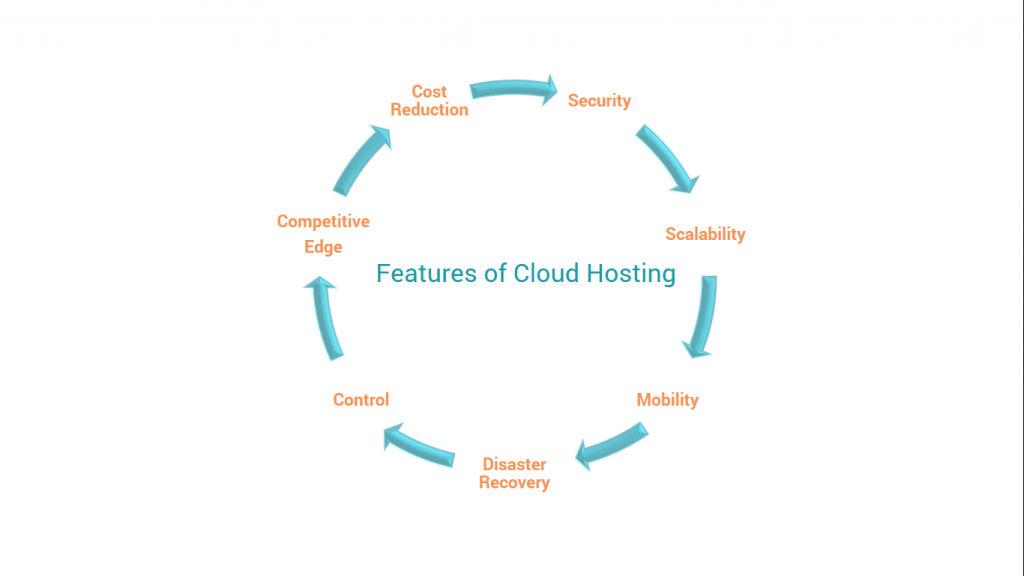
However, with the emergence of Cloud Computing, most of these business challenges have disappeared since it offers the required scalability of IT infrastructure based on changing business needs. On-demand scalability is one of the significant advantages that Cloud services offer besides enhanced security and cost-effectiveness.
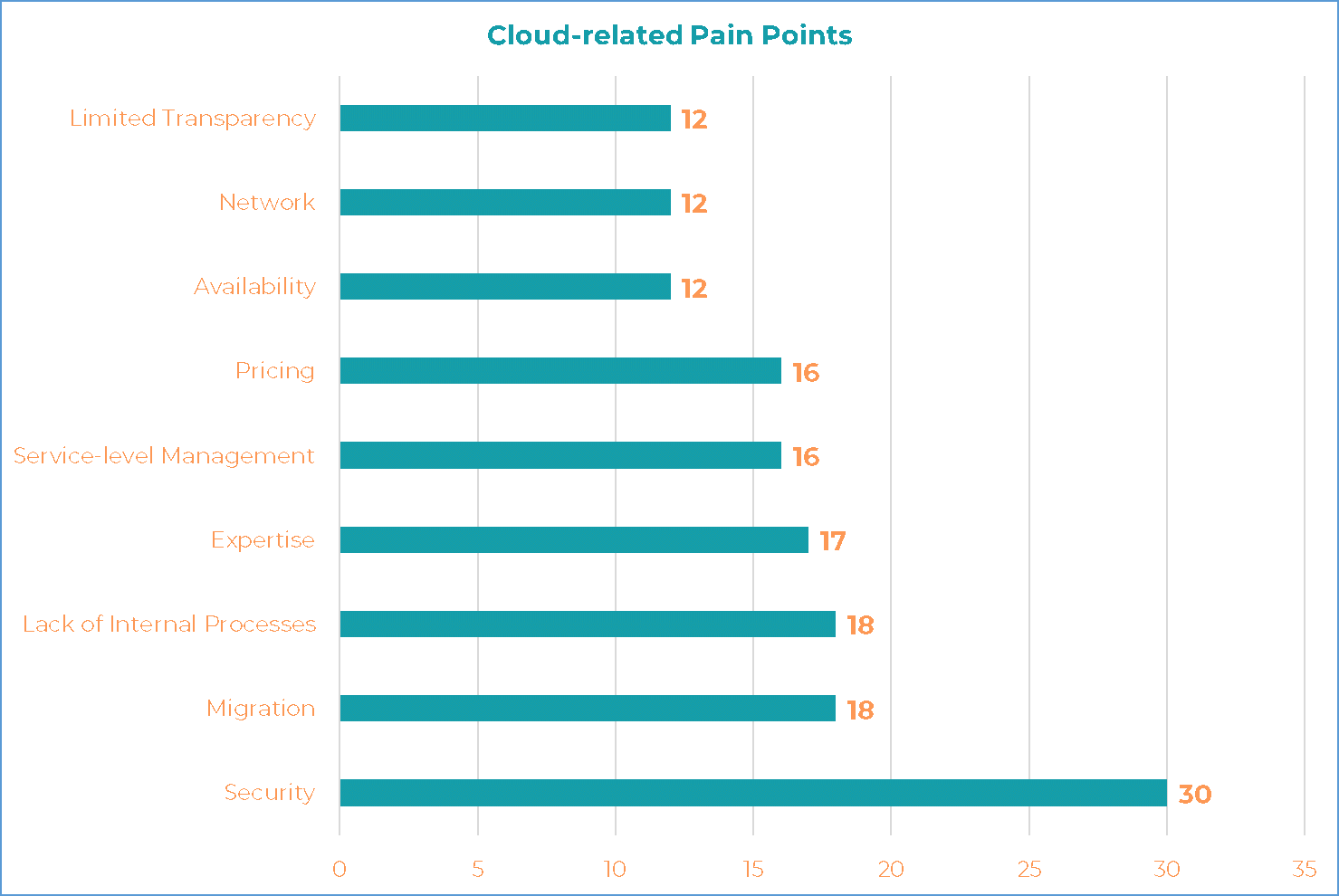
For businesses, the process of Cloud migration can be a significant challenge if it is done without proper planning, execution, and lastly, testing. On a list of some common cloud-related pain points, migration is one of the key challenges preceded by the security of the Cloud.
However, once the Cloud migration process has been successfully carried out, businesses get a feeling of utmost satisfaction.
Cloud migration defines the process of moving data, applications, and other essential business components from an organization’s on-premise systems to a Cloud-based service. Cloud is a virtual pool of users’ demands along with shared resources designed to offer computing, storage, and network services on the go.
If you have data that is hosted on an on-premise system can hinder your business growth as they might be using legacy and insufficiently utilized resources. Today, every business needs to be agile as well as flexible to match up with changing demands of the market quickly. With Cloud services, you can easily capitalize on such demands. The Cloud-hosted environment also offers several benefits in comparison with on-premise infrastructure.
After you have decided to move to the Cloud-based setup from an on-premise solution you can deploy the following 3 steps for an effective Cloud migration-
Step 1: Plan and Prepare Your Migration
Before making the actual move to the Cloud, you need to prepare your internal team before starting with the migration process. The degree of migration details is purely dependent. However, there is a certain checklist that you need to follow.
You should be well aware of why you are looking to make a move to a Cloud setup. As discussed above, Cloud does offer several benefits, but what are the benefits that your business will receive upon migrating your applications and data to the Cloud? To perform a seamless migration without hindering your process, you can leverage the benefits of a Cloud Hosting Provider.
When you’re moving your applications and other data to a Cloud from an on-premise setup, two approaches can be followed for migration. These methods are- shallow Cloud integration and deep Cloud integration.
Step 2: Select Your Cloud Environment
Also, before initiating the migration process, you must decide the kind of cloud model is right for you to adopt, i.e., a single Cloud environment or a multi-Cloud environment.
Step 3: Migrate Your Applications & Data
Now that you have analyzed all your pre-migration requisites, its time to make a move to Cloud. After a careful analysis of migration planning, the migration process will be entirely seamless and quick. Depending on the size of your applications and data, there are different approaches for moving everything to the Cloud.
If you have apps and data that are low in size, then you can replicate all of your data using an Internet connection. However, this method can fail if the volume of applications and data is large, so you will have to compress these before sending it over the Internet. To minimize the bandwidth-associated costs, you can even send the physical drivers to your Cloud provider.
A successful Cloud migration process also needs to be fully secured. All the temporary storage where your data is stored needs to be equally secured like your final migration destination. A trusted Cloud hosting provider will help you with the right set of migration tools for an easy and quick process.
Moving your applications and data to a Cloud is an excellent option for any expanding business. Cloud offers various benefits like scalability, data security, and most important availability at all times from any location. A trusted Cloud hosting provider helps in carrying out a smooth and quick migration along with enhanced security for your data and applications at all stages.
If you have data & applications and looking to make a move to Cloud, feel free to reach out bodHOST Team for an enhanced Secure Cloud Hosting Experience backed by exuberant migration support.

Explore more hosting insights, tips and industry updates.
With the help of digitalization, today’s enterprises, and transactions are performed on online platforms. Everyone…
In this rapid changing world in order to meet the changing needs of the business…
I recall reading an article several years ago about a privacy issue with regard to…