
Connecting to Windows VPS Using Different OS and Remote Desktop
If you’re a fan of the Windows Virtual Private Server, you should know about the…

Knowing your system’s OS version is vital for troubleshooting issues, seeking software support, and ensuring software compatibility. This guide covers every major platform: Windows, Linux (all major distros), macOS, and Unix, using command-line tools that give you instant, accurate results without opening a single settings menu.
Use the table below to instantly find the right command for your platform.
| Platform | Command | Output |
|---|---|---|
| Windows CMD | ver |
Windows version |
| Windows CMD | winver |
Version & build dialog |
| Windows CMD | systeminfo | findstr /B /C:"OS" |
OS details |
| Windows CMD | wmic os get Caption,Version,BuildNumber |
OS + version + build |
| PowerShell | [System.Environment]::OSVersion |
Full OS version |
| Linux | uname -a |
Kernel + architecture |
| Linux | cat /etc/os-release |
Distro + version |
| Linux | lsb_release -a |
Release details |
| Ubuntu | lsb_release -d |
Ubuntu version |
| Debian | cat /etc/debian_version |
Debian version |
| CentOS / RHEL | cat /etc/redhat-release |
RHEL / CentOS version |
| Fedora | cat /etc/fedora-release |
Fedora version |
| Kali | cat /etc/os-release | grep VERSION |
Kali version |
| WSL | wsl --version |
WSL + kernel |
| macOS | sw_vers |
macOS version |
| macOS | sw_vers -productVersion |
Version only |
| Unix / AIX | uname -a |
Kernel + OS details |
| Unix / AIX | oslevel |
AIX version |
Windows provides several command-line methods to check your OS version. Here are the most reliable ones, from quickest to most detailed.
Windows: The ver command is the simplest way to display the Windows OS version and copyright information. It works on all Windows versions from XP through Windows 11 and runs without administrator privileges.
ver
Example output:
Microsoft Windows [Version 10.0.22621.3593]
The number breakdown: 10.0 = Windows 10 / 11 base, 22621 = build number (22H2 in this case), 3593 = update revision.
Windows The winver command launches a small dialog box that shows your Windows edition, version, build number, and registered user, more human-readable than ver.
winver
This opens the About Windows dialog. It tells you the Windows edition (e.g., Windows 11 Home), version (e.g., 23H2), and OS build number all on one screen. You can run it from the Run dialog (Win+R) or any command prompt.
Windows The systeminfo command provides comprehensive system information, including OS version, build, install date, processor, RAM, and more. It is ideal when you need full system details.
systeminfo
To filter just the OS-related lines:
systeminfo | findstr /B /C:"OS Name" /C:"OS Version" /C:"OS Build Type"
Example output:
OS Name:                   Microsoft Windows 11 Pro

OS Version:                10.0.22621 N/A Build 22621

OS Build Type:             Multiprocessor Free
Windows The Windows Management Instrumentation Command-line (wmic) lets you query OS information in a format that is easy to parse in scripts.
wmic os get Caption,Version,BuildNumber
Example output:
BuildNumber  Caption                              Version

22621        Microsoft Windows 11 Pro             10.0.22621
To get the OS architecture:
wmic os get osarchitecture
To get the product name and version together:
wmic os get name,version
Windows PowerShell provides rich OS version information through .NET and WMI objects.
Get full OS version object:
[System.Environment]::OSVersion
Get just the version string:
[System.Environment]::OSVersion.VersionString
Get OS name and version via CIM (recommended for Windows 10+):
(Get-CimInstance Win32_OperatingSystem).Caption

(Get-CimInstance Win32_OperatingSystem).Version
Check Windows Server version from the command line:
Get-ComputerInfo | Select-Object OsName, OsVersion, WindowsVersion
Example output:
OsName          : Microsoft Windows 11 Pro

OsVersion       : 10.0.22621

WindowsVersion  : 2009
| What You Want | Command |
|---|---|
| Kernel version (same on all distros) | uname -r |
| Distribution name + version | cat /etc/os-release |
| Distribution info (human-readable) | lsb_release -a |
Linux uname is available on every Linux and Unix system. It reports kernel-level information.
# Full info: kernel name, hostname, kernel release, version, machine, OS
uname -a
# Just the kernel version number
uname -r
# Just the OS/kernel name
uname -s
# Machine hardware (x86_64, aarch64, etc.)
uname -m
Example output of uname -a:
Linux myserver 5.15.0-107-generic #117-Ubuntu SMP Fri Apr 19 02:08:17 UTC 2024 x86_64 x86_64 x86_64 GNU/Linux
Linux: The /etc/os-release file is the most reliable, cross-distro method. It exists on virtually all modern Linux distributions.
# Show all contents
cat /etc/os-release
# Show only the pretty name (e.g., "Ubuntu 22.04.4 LTS")
grep PRETTY_NAME /etc/os-release
# Show just the version number
grep VERSION_ID /etc/os-release
Example output:
NAME="Ubuntu"
VERSION="22.04.4 LTS (Jammy Jellyfish)"
ID=ubuntu
ID_LIKE=debian
PRETTY_NAME="Ubuntu 22.04.4 LTS"
VERSION_ID="22.04"
HOME_URL="https://www.ubuntu.com/"Linux lsb_release prints Linux Standard Base (LSB) information about the distribution. It is available on Debian, Ubuntu, and most derivatives. On minimal installs, you may need to install it first.
# Show all LSB info
lsb_release -a
# Show only the description line
lsb_release -d
# Show only the release number
lsb_release -r
# Show codename only
lsb_release -c
Example output of lsb_release -a:
No LSB modules are available.
Distributor ID: Ubuntu
Description:    Ubuntu 22.04.4 LTS
Release:        22.04
Codename:       jammy
Install if missing:
# Debian/Ubuntu
sudo apt install lsb-release
# CentOS/RHEL
sudo yum install redhat-lsb-coreUbuntu uses both lsb_release and its own release file.
# Best method — shows full Ubuntu version
lsb_release -a
# Quick check — just the version number
lsb_release -d
# Alternative — from the release file
cat /etc/ubuntu-release 2>/dev/null || cat /etc/os-release
# Check via the update manager file
cat /etc/lsb-release
Example output:
Description: Ubuntu 22.04.4 LTS
Debian maintains its own version file alongside the standard /etc/os-release.
# Debian-specific version file
cat /etc/debian_version
# Full info via os-release
cat /etc/os-release
# Check distribution version via lsb_release
lsb_release -a
Example output of cat /etc/debian_version:
12.5
CentOS, RHEL, and Red Hat-based systems use a dedicated release file.
# CentOS/RHEL release file
cat /etc/redhat-release
# Rocky Linux / AlmaLinux (RHEL-compatible)
cat /etc/rocky-release
cat /etc/almalinux-release
# Universal method
cat /etc/os-release
# Using rpm to check release version
rpm -q centos-release
rpm -q redhat-release-server
Example output:
# CentOS
CentOS Linux release 7.9.2009 (Core)
# RHEL
Red Hat Enterprise Linux release 9.3 (Plow)
To check the RHEL version from the command line with a single command:
cat /etc/os-release | grep "PRETTY_NAME"
# Fedora-specific release file
cat /etc/fedora-release
# Universal method
cat /etc/os-release
# via rpm
rpm -E %fedora
Example output:
Fedora release 40 (Forty)
Kali Linux is a rolling-release distribution. Version information is in the standard files.
# Show Kali version
cat /etc/os-release | grep VERSION
# Full details
cat /etc/os-release
# Kali-specific
cat /etc/kali-release 2>/dev/null || lsb_release -a
Example output:
VERSION="2024.1"

VERSION_ID="2024.1"

VERSION_CODENAME="kali-rolling"
macOS provides the sw_vers command for clean, scriptable version output.
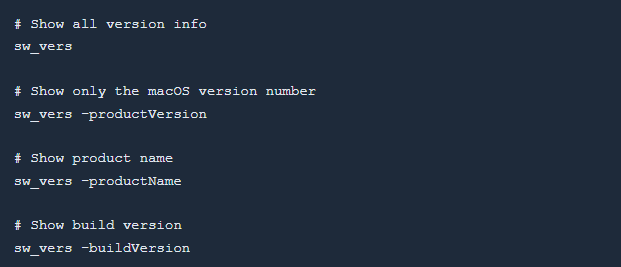
Example output of sw_vers:

You can also use the system_profiler command for detailed information:

Or via the terminal with uname:
uname -a
# Darwin MacBook.local 23.5.0 Darwin Kernel Version 23.5.0 ... x86_64Traditional Unix systems use uname plus platform-specific commands.
General Unix (any system):
uname -a
uname -r   # kernel release
uname -s   # OS name
uname -v   # OS version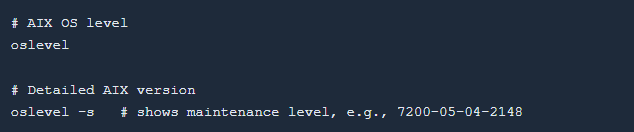


If you are managing a Linux VPS or Dedicated Server, checking your OS version is often the first step when troubleshooting compatibility issues, applying security patches, or installing software. The commands on this page work for any Linux VPS regardless of the control panel.

Explore more hosting insights, tips and industry updates.
If you’re a fan of the Windows Virtual Private Server, you should know about the…
This post will show how you administrators can easily either enable or disable a PHP…
Websites that are directly boosting business growth are always complicated for business owners and the…