How To Change The Schedule To Process Log Files Via WHM?
Log processing is an important part of server monitoring. To get the most out of…


 Vincer
We will explain How to Transfer Backup from cPanel to VPS in this article.
Taking regular data backups is a good habit that allows you to create a reserve copy in case of an emergency. You can easily accomplish this by creating a backup of the web site’s data and uploading it to your VPS server. This article will teach you how to directly transfer a website’s backup from cPanel to VPS.
To Move a Backup from cPanel to a VPS


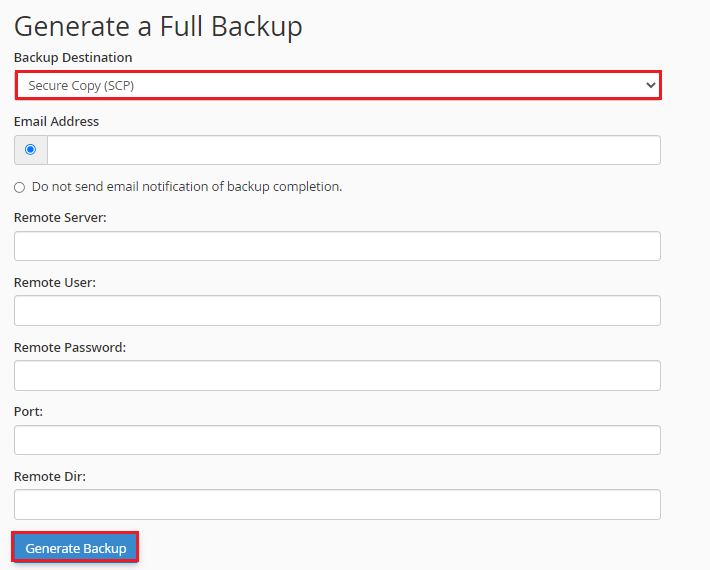
Email Address: Enter an email address where you want to be notified when the backup transfer is complete.
Remote Server: Enter your VPS’s IP address.
Remote User: Enter the hosting account’s username. If none enter, the system will assume the user is root by default.
Remote Password: Enter the user account’s password.
Port (optional): You can leave this field blank and continue. If you filling it out, enter the port that was listed in the VPS details.
Remote Dir: Enter the directory path for restoring backup files on your VPS here.
Please keep in mind that you can leave the Remote Dir field blank. In that case, the backup files automatically transferred to your VPS’s root file.
The system will display a message informing you that the Full Backup is currently being generated.
It will directly upload the backup file to the VPS’s directory and send a copy to the specified email address once the process is complete.
We sincerely hope that you must now have got a clear idea regarding How to Transfer Backup from cPanel to VPS Server. However, if you are still facing any difficulty in the procedure mentioned above, feel free to reach out to the bodHOST Team for proactive support 24×7.

Explore more hosting insights, tips and industry updates.
Log processing is an important part of server monitoring. To get the most out of…
In this article, we will explain the 500 Internal Server Error and how to resolve…
The web-based control panels have been one of the key innovations to take place in…