How to Find the Missing htaccess File?
What is an .htaccess file? A .htaccess (Hypertext Access) file is a directory-level configuration file…

 Paul Lopez
An MCP server uses the Model Context Protocol (MCP) to provide an AI application with tools, data, and reusable instructions. It provides a controlled link between an AI assistant and systems, including files, databases, business apps, and third-party APIs.
When AI assistants have the ability to do more than just create words, they are beneficial. They could have to read a report, file a support ticket, look up an order, or check internal documentation. Every one of those activities is dependent upon an external system.
A standard method for connecting AI applications to those systems is provided by the Model Context Protocol. The component that reveals a certain set of capabilities is an MCP server. This post will describe what an MCP server is, how it functions, why it’s important, what features to look for, and how to configure one.
An MCP server is a small application or service that connects an AI client to one or more tools or information sources. It follows the rules of the Model Context Protocol so the client can discover available capabilities and request them in a predictable format.
For example, imagine an AI assistant that needs to work with a company’s issue-tracking system. An MCP server could expose tools such as:
The AI client does not need to know how the issue tracker’s private API works. The MCP server handles that part. It validates the request, calls the underlying service, applies the required permissions, and sends the result back to the client.
This separation is important. The AI model decides what it wants to accomplish, while the server controls how that request reaches a real system. The model is not given unrestricted access to a database or an operating system. Instead, it is offered specific capabilities with defined inputs and outputs.
The interaction usually begins when an AI application connects to an MCP server. The client and server establish a session and exchange capability information. The server then makes its available features discoverable to the client.
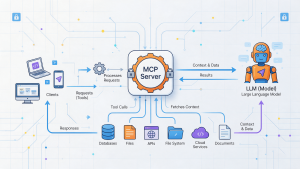
An MCP server may expose three main types of capabilities:
A typical request flow looks like this:
There are two types of connections: local and remote. When a client launches a local server as a process, standard input/output (stdio) is frequently utilised. When a server needs to enable network connections and operates as a distinct service, streamable HTTP is utilised.
Additionally, the server may handle problems, set rate limitations, keep track of session information, and log activity for troubleshooting purposes. Since these operational elements vary from implementation to implementation, it is better to intentionally create them rather than relying on MCP to provide them.
MCP and an MCP server are closely related, but they are not interchangeable terms. The former is the protocol itself.
It defines the common language and interaction rules used by an AI client and a server. It covers concepts such as capability discovery, tool calls, resources, prompts, and message exchange.
An MCP server is a working program built to use that protocol. It connects the standard interface to a specific service or group of services. One server might work with GitHub, while another might provide access to a company knowledge base or a set of internal APIs.
A useful comparison is a web API standard and a particular web service. The standard explains how communication should work; the service implements those rules for a real use case.
Keeping the two ideas separate makes the architecture easier to understand:
This design also improves reuse. If several AI applications support MCP, the same server may be used by all of them, subject to the access rules configured by the organization.
An MCP setup generally has three main layers: the AI host and client, the MCP server, and the backend system.
Request flow
This structure keeps AI reasoning separate from system access. If the backend changes, the server can often absorb that change without requiring a complete redesign of the AI application.
A server can follow the protocol and still be difficult or unsafe to use. A well-designed MCP server should make its capabilities understandable to both the AI client and the people responsible for operating it.
Important qualities include:
The best MCP servers are designed for the AI’s decision-making process, not just for developers. A concise description and a safe, predictable interface can make a large difference in the quality of the final result.
AI applications often need to combine language reasoning with live information and real actions. MCP servers help provide that connection without forcing every AI product to build a separate integration for every service.
They connect AI to useful systems: An assistant can access current business data instead of relying only on its training or a static knowledge base.
MCP is not a substitute for good application architecture. It is a common connection layer that can make an AI system easier to extend and govern when it is implemented carefully.
The exact feature set varies by server, but most useful implementations include the following capabilities:
These features work together. Discovery is more useful when descriptions are clear, and tool access is safer when it is paired with strong authorization and input validation.
MCP servers and traditional APIs can work together, but they serve different audiences and purposes. A REST or GraphQL API is generally designed for software developers and fixed application flows. An MCP server is designed to make selected capabilities understandable and usable by AI applications.
| Feature | MCP server | Traditional API |
|---|---|---|
| Primary audience | AI clients and agent runtimes | Software applications and developers |
| Discovery | Capabilities can be described and discovered at runtime | Clients usually rely on documented endpoints |
| Interface | Tools, resources, prompts, and structured messages | Endpoints, queries, and service-specific operations |
| Access pattern | Often supports multi-step, model-driven workflows | Usually follows a predefined application flow |
| Integration role | Adapts one or more services for AI use | Directly exposes a service or data operation |
| Validation needs | Must account for ambiguous model-generated input | Usually receives input from programmed clients |
| Observability | Useful to track agent, tool, and session behavior | Usually focuses on request and service metrics |
An MCP server does not make an existing API unnecessary. In many cases, it sits in front of that API and exposes a smaller, safer set of operations for an AI client.
MCP servers can be built around almost any system that an AI application needs to use. Common examples include:
A good example is a database server that exposes get_sales_summary instead of allowing arbitrary SQL. The first option is easier to secure and easier for an AI model to choose correctly. The server can still use SQL internally, but the AI receives a focused business operation.
MCP servers are useful wherever an AI application needs dependable access to external information or actions. Typical use cases include:
The right use case depends on the risk and the permissions involved. Read-only access is often a sensible first step before allowing an agent to change records or trigger external actions.
The setup process depends on the language, SDK, client, and backend you choose. The following sequence provides a practical starting point.
Set Up Your Environment
Choose the runtime for your server and install the relevant MCP library or SDK. Create a separate development environment and keep credentials outside the source code. Decide whether the server will run locally through stdio or as a remote service over HTTP.
Before writing code, identify the backend permissions the server needs. A server that only reads a knowledge base should not use credentials that can delete records or change production settings.
Define Your MCP Server Structure
Start with one small, useful capability. Give it a clear name, a precise description, and a strict input schema. Define what a successful response looks like and which errors the client may receive.
Keep the integration logic separate from the protocol layer where practical. This makes it easier to test the backend call on its own and to replace the underlying service later. Add logging and timeouts from the beginning rather than treating them as production-only features.
Connect to an AI Client
Configure a compatible AI host or agent runtime with the server’s command or endpoint. For a local server, this often means providing the command used to start the process. For a remote server, configure the URL and the required authentication method.
After the connection is established, confirm that the client can see the server’s tools, resources, or prompts. Review the descriptions shown to the model; unclear metadata often causes problems before the backend code does.
Test Your Implementation
Test each capability with valid, missing, unexpected, and unauthorized inputs. Check that the server returns useful results and readable errors. Also test backend timeouts, rate limits, expired credentials, and partial failures.
Run a complete workflow through the AI client, but do not rely on a successful demo alone. Confirm that permissions are enforced, sensitive values are not written to logs, and write operations require appropriate safeguards. Once the local behavior is reliable, test the server under the expected concurrent load before deploying it remotely.
MCP makes connection easier, but it does not remove the need for ordinary security engineering. Treat every server as an access layer to real data and real actions.
An MCP server gives an AI application a structured way to use external tools, data, and instructions. It sits between the AI client and the backend, translating requests, enforcing controls, and returning results in a format the client can use.
The main benefit is not simply that an AI can call an API. The bigger advantage is a reusable connection model: compatible clients can discover capabilities, teams can add integrations without rewriting the whole AI application, and organizations can apply consistent security and monitoring around tool use.
A successful implementation should begin with a narrow purpose, clear tool definitions, limited permissions, and thorough testing. When those foundations are in place, MCP servers can turn an AI assistant from a text generator into a practical system that can safely work with the tools people use every day.

Explore more hosting insights, tips and industry updates.
What is an .htaccess file? A .htaccess (Hypertext Access) file is a directory-level configuration file…
With 22 Core, 14 nm engraving, security, and telemetry functions strengthened, Intel Xeon E5-2600 v4…
Google’s Gmail provides a free SMTP server, it can be utilizing by anybody who has…