How to change the language in your WHM
This tutorial will teach you how to change the language of the WHM interface. The…

 admin
admin
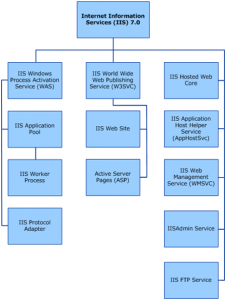
IIS (Internet Information Services) is a web server developed by Microsoft. It runs only on Windows operating systems and is commonly used to host websites and web applications on Windows servers.
IIS makes it easy to publish information on the internet or a private intranet. It includes a wide range of administrative features for managing websites and the web server itself. With technologies such as ASP.NET, you can create and deploy scalable and flexible web applications.
IIS is not always installed by default on Windows systems, but it can be added through the operating system’s feature management tools.
The exact steps depend on your version of Windows. Below is the general process for modern Windows versions (such as Windows 10, Windows 11, or Windows Server):
If the installation was successful, you should see the default IIS welcome page.
By default, website files are stored in:
C:\inetpub\wwwroot
You can place your website files in this folder or create a virtual directory pointing to another location.
After creating the virtual directory, you can access the content by visiting:
http://localhost/your-alias

Explore more hosting insights, tips and industry updates.
This tutorial will teach you how to change the language of the WHM interface. The…
In this article, we will discuss the process of creating and verifying checksums on Linux.…
Transferring emails from G Suite to a cPanel server can be beneficial under certain conditions,…