How to Unzip Files in CMD (Windows 10 & 11) – 4 Methods
Need to extract a ZIP file without touching your mouse? Windows gives you four solid…

 Paul Lopez
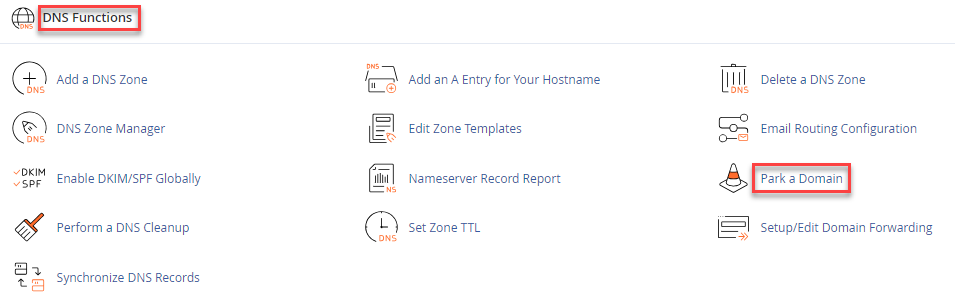
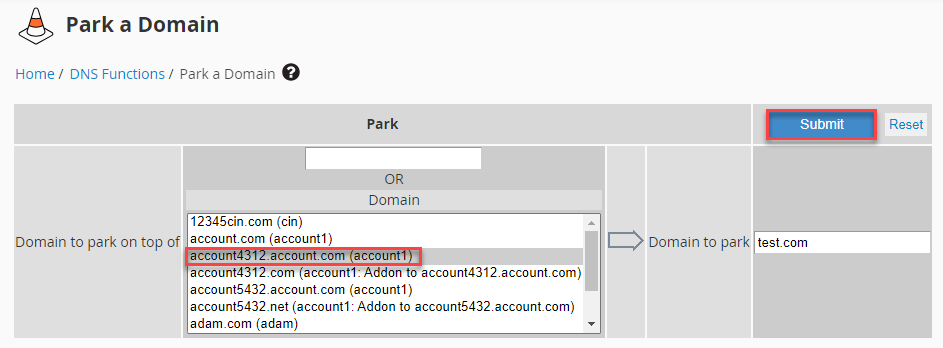
This article explains how to park a domain using WHM. To park a domain using WHM is to associate it with an existing account, allocating it to share the same resources and settings.
Let us follow the steps-
This concludes our discussion. For more information, visit our KB section regularly and explore our latest web hosting plans.
Discover More about What is the Difference Between a Parked Domain and a Subdomain.

Explore more hosting insights, tips and industry updates.
Need to extract a ZIP file without touching your mouse? Windows gives you four solid…
No wonder, cloud computing is considered to be the mainstream technology for most companies…
In this tutorial, we’ll explain to you the problems stemming when MySQL fails to begin…