

How to Restore a cPanel Account from a cpmove File
A cpmove file is the archive cPanel and WHM use to transfer or restore a…

Many programmers utilize the distributed version control system known as Git. Git functionalities can be accessed without using the command line thanks to the practical graphical interface offered by the cPanel Git™ Version Control tool.
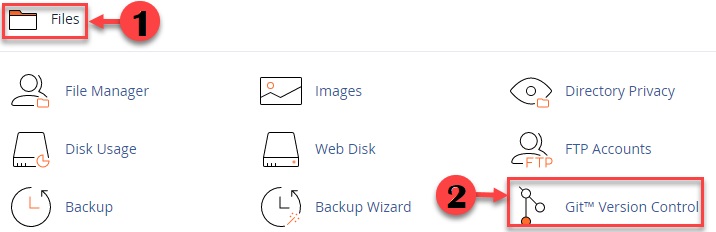
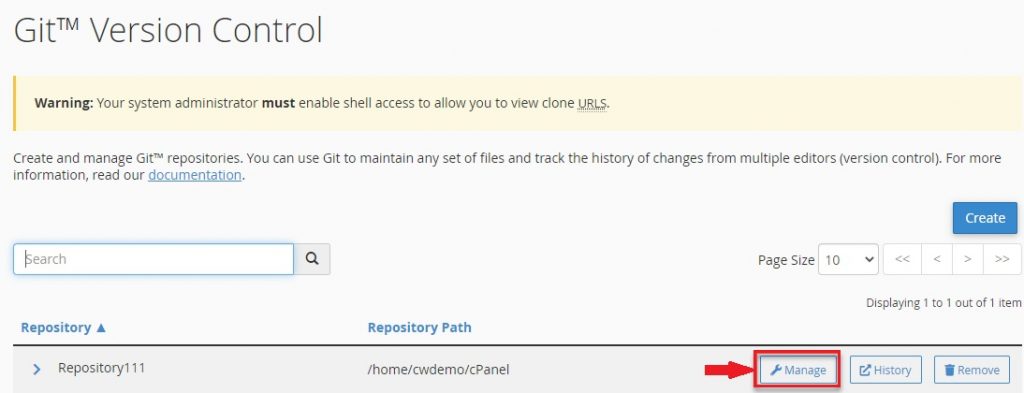
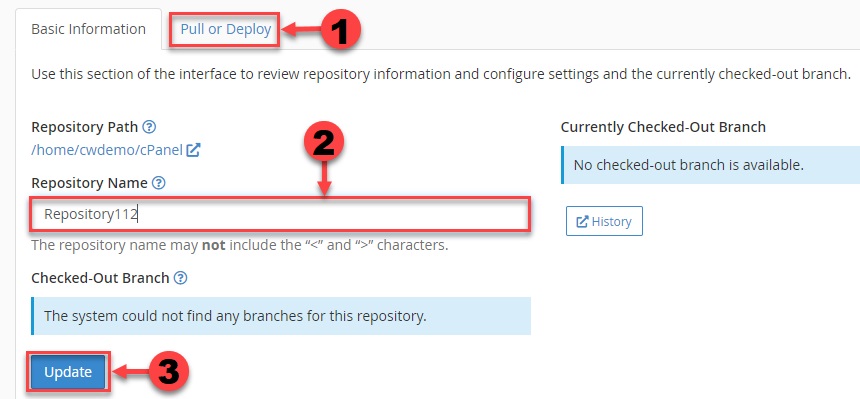
This tutorial will demonstrate how to use Git™ version control in cPanel to update a website. Git™ keeps track of the changes you make to files so you can look back and, if required, roll back to earlier versions.
Follow the instructions below to update the website:

This is how you may update a website using cPanel’s Git™ version control system. I sincerely hope you had a great time and learned a lot from reading this post. Also, you can check the latest cPanel web hosting plans.

Explore more hosting insights, tips and industry updates.
A cpmove file is the archive cPanel and WHM use to transfer or restore a…
If you do not have the special programming knowledge, but you are willing to create…
This post will show how you administrators can easily either enable or disable a PHP…