How to Use WHM to Download a Domain’s Raw Apache Logs
This post will show you how you can download the Raw Apache logs from WHM…

 Paul Lopez
Examining the size of a MySQL database serves various purposes. Monitoring the size of your MySQL database is an important task, helping in resource management, optimizing performance, and ensuring adherence to legal compliance requirements.
Let us follow the steps-
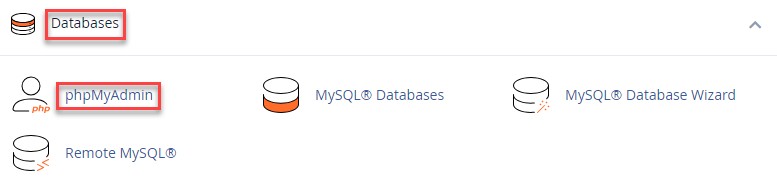
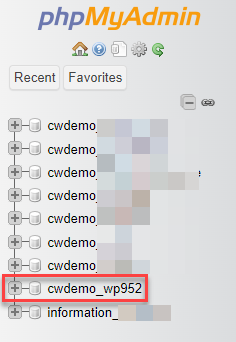
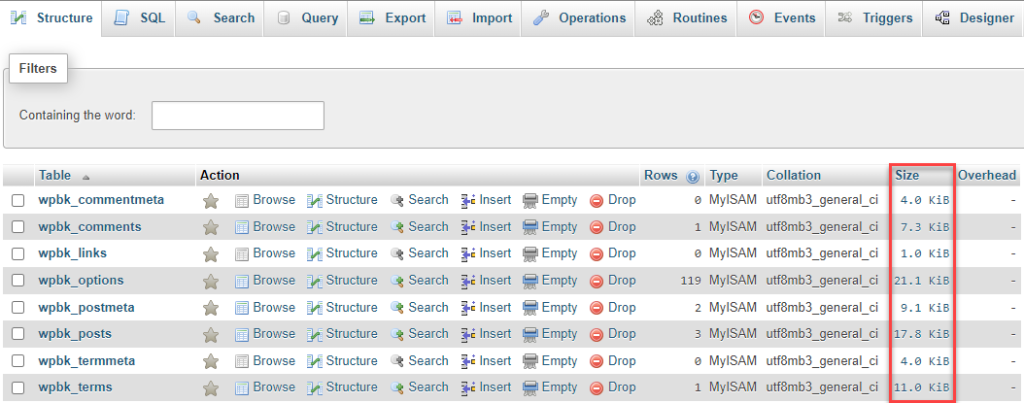
In such a manner, you can inspect the sizes of the MySQL database. Also, You can learn more about How can you map MySQL databases and users to cPanel users.

Explore more hosting insights, tips and industry updates.
This post will show you how you can download the Raw Apache logs from WHM…
Building a website for any business isn’t a hard task anymore today. Online business environments…
Cloud and cPanel web hosting both are the best but there are differences in their…