Google Search Console (GSC) is one of the most powerful tools for SEOs, marketers, and website owners. But let’s be honest, how many times have you looked at a sudden spike or drop in traffic and wondered: “What happened on this date?”
Was it a website update? A Google algorithm change? A technical fix? A content update?
Previously, monitoring such updates required maintaining external spreadsheets, documentation tools like Notion or Google Docs, or relying on memory.
But things have changed.
Google has finally rolled out one of the most requested features of all time: the Annotation Feature in Search Console. This new update allows you to add notes directly inside your performance charts, making your SEO analysis smoother, smarter, and far more organised.
What is the Annotation Feature in Google Search Console?
The Google Search Console Annotation Feature allows users to add small notes, called annotations, to specific dates in the Performance Report. These notes help explain why certain traffic changes occurred on a particular day.
Annotations give context to your SEO data. Instead of guessing why impressions or clicks spiked or dropped, you can attach meaningful explanations, such as:
- “Redirects updated”
- “Blog migration completed.”
- “New landing page published”
- “Technical fix deployed”
- “Core algorithm update occurred”
System vs. Custom Annotations
Google now supports two types of annotations:
- System Annotations: Automatically added by Google when there are data processing issues or reporting delays.
- Custom Annotations: Manually added by users to mark important SEO changes or website updates.
This blend of system and user-generated context makes performance tracking clearer and more accurate than ever.
Why Did Google Introduce This Feature?
Before annotations were introduced, SEOs had to track all changes manually in spreadsheets, documents, or project management tools. This created multiple challenges:
- Hard to match events with traffic fluctuations.
- Teams struggled to stay aligned on timelines.
- Switching between tools slowed down the analysis.
- Reporting required extra documentation and explanations.
The SEO community has been requesting an annotation feature for years. Google’s update finally fills this gap by enabling quick, in-platform notes that improve workflow, collaboration, and historical tracking.
By allowing annotations directly in the Search Console Performance Report, Google simplifies how SEOs analyze data and share insights across teams.
How Does the Annotation Feature Work?
Adding annotations in Google Search Console is simple. Here’s a step-by-step guide:
- Open Google Search Console.
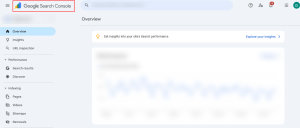
- Navigate to the Performance Report.
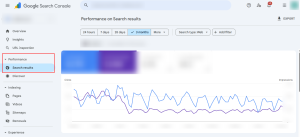
- Right-click on any date on the graph.
- Select “Add Annotation.”
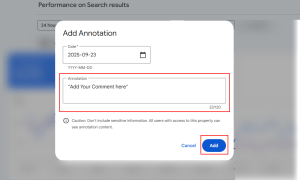
- Enter your note (up to 120 characters).
- Save.
Visibility & Limits
- Annotations are visible to all users who have access to the Search Console property.
- You can add up to 200 custom annotations per property.
- Older annotations auto-delete after 500 days.
This shared visibility helps improve transparency across SEO, marketing, and development teams.
Types of Annotations
1. System Annotations: These are generated automatically by Google. They appear when Google adjusts the reporting system or encounters data processing anomalies.
Examples:
- “Data processing issue”
- “Search data updated”
- “Analytics integration delay”
2. Custom Annotations: Added by users to mark important websites and SEO activities, such as:
- Site Migrations
- Domain migration
- HTTP to HTTPS
- URL restructuring
- Algorithm Updates
- Google Core Update
- Spam Update
- Helpful Content Update
- Technical Fixes
- Page speed improvements
- Fix for indexing issues
- Schema markup updates
- Marketing Campaigns
- New content launches
- Paid campaigns
- Product promotions
These annotations act as your historical timeline for SEO projects and help you understand how changes impact performance.
Benefits of Using Annotations in Search Console
- Provides Context to SEO Data: Annotations prevent confusion by linking performance changes to real actions or events. This helps you clearly identify the cause of sudden spikes or drops.
- Improves Collaboration Across Teams: Because all annotations are visible to everyone with property access, SEO teams, developers, content writers, and marketers can stay aligned.
- Helps Track Historical Changes: Instead of digging through old emails or spreadsheets, annotations give you a historical record built right into your Search Console.
- Enhances SEO Data Analysis: Context makes data meaningful. With annotations, you can analyze:
- The effect of algorithm updates
- The results of technical optimizations
- Performance after publishing new content
- Better Reporting for Clients: SEOs can now create clean, contextualized reports for clients by showing annotations alongside traffic changes.
Limitations of the Annotation Feature
While the feature is extremely useful, there are a few limitations:
- Annotations cannot be edited. You can only delete and recreate them.
- All users can see annotations, so avoid adding confidential information.
- Annotations older than 500 days are automatically deleted.
- Character limit is only 120 characters.
Despite these restrictions, the feature still provides major benefits for day-to-day SEO operations.
Why This Matters for SEO Professionals?
The Google Search Console Annotation Feature is a game-changer for SEOs because:
- It helps diagnose traffic drops and spikes faster
- It lets teams track the real-world impact of updates
- It makes reporting clearer and more transparent
- It supports strategic planning based on historical data
- It eliminates the need for external tracking tools
For marketers and SEO teams, this makes Google Search Console not just a reporting tool, but a complete SEO workflow tool.
FAQs – GSC Annotations
- What are Google annotations?
Custom annotations are short notes you can add directly onto the Performance charts in Google Search Console to record site changes, campaigns, outages, or external events that might explain rises or drops in clicks, impressions, or position.
- What is the annotation feature in Google Search Console?
It’s a built-in tool in the Performance report that lets you mark an exact date on the chart and attach a note (title/description) so you and your team can later correlate events with traffic changes. Annotations appear as visual markers on the chart.
- How many annotations can I add?
You can create up to 200 annotations per Search Console property. Older annotations are automatically removed after about 500 days (about 1 and a half years), so be selective about what you record.
Steps to annotate:
- Open Google Search Console and go to the Performance report.
- Click (or right-click) on the date on the performance chart where you want to place the note.
- Choose Add annotation (or Add note).
- Enter a short title and the note text (keep it concise). Some rollout reports mention a short character limit for notes, treating entries like micro-notes.
- Save. The annotation marker appears on the chart and is visible to anyone who can access that property.
- What does Google Search Console tell you?
Search Console shows performance metrics (clicks, impressions, CTR, average position) and the annotations give context, so you can link traffic changes to deployments, migrations, content updates, algorithm updates, marketing campaigns, downtime, or other events. Use annotations as an internal changelog that lives next to your data.
- Are annotations visible to all users?
Yes, anyone with access to the Search Console property can view the annotations. Don’t include sensitive data (passwords, private keys) in annotations because they’re visible to all verified users of that property.
Conclusion
The new Google Search Console Annotation Feature is one of the most exciting Google Search Console updates in years, finally giving SEOs a simple way to connect actions with performance results. No more guessing, no more scattered notes. Just clean, contextual insights right where you need them. Whether you manage SEO for a big brand, run campaigns, or optimize websites at bodHOST, annotations make your workflow smoother and your reporting sharper.
So why wait?
Start using annotations today and experience how much clearer your SEO story becomes, one note at a time.
Learn more in our detailed article: How to Get Your Business Seen in Google’s New AI Mode


 Paul Lopez