The Best Alternatives and Factors to Host Business Website
Today, the need for a website for all companies can not be stressed enough. It…


 Paul Lopez
Google Search is changing rapidly as AI Overviews and AI Mode become part of how users discover information online. For website owners and SEO professionals, understanding whether their content appears in these AI-powered results is becoming increasingly important. The new Search Generative AI Performance Report in Google Search Console provides valuable visibility into this emerging search experience. In this article, we explain what the report includes, where to find it, how to use the data, and what information is still missing.
Google Search is increasingly using generative AI to provide users with more detailed and conversational answers. AI Overviews and AI Mode can display information from multiple sources, giving users a different way to discover websites and content. The Search Generative AI Performance Report provides website owners with a dedicated view of how their pages appear in these AI-powered experiences. It currently provides visibility data for AI Overviews and AI Mode within Google Search.
Previously, website owners could see overall Search performance but had limited visibility into how their content was being surfaced specifically through generative AI features. The new report provides an additional layer of information for understanding this changing search environment. For SEO professionals, this makes it easier to monitor AI visibility and identify which pages are being surfaced in Google’s newer search experiences.
The report provides several useful data points, although it is important to understand its current limitations.
The report does not currently provide clicks, click-through rate, or query-level data. This means you can see that a page received an AI impression, but you cannot see the exact search query that triggered it or whether that impression resulted in a website visit. This is an important limitation when evaluating the actual business value of AI visibility.
The Generative AI Performance Report is available within Google Search Console for eligible properties. Google is rolling out the feature gradually, so it may not be visible in every account immediately. The report appears as part of Search Console’s performance reporting and provides a dedicated view of visibility from supported generative AI features.
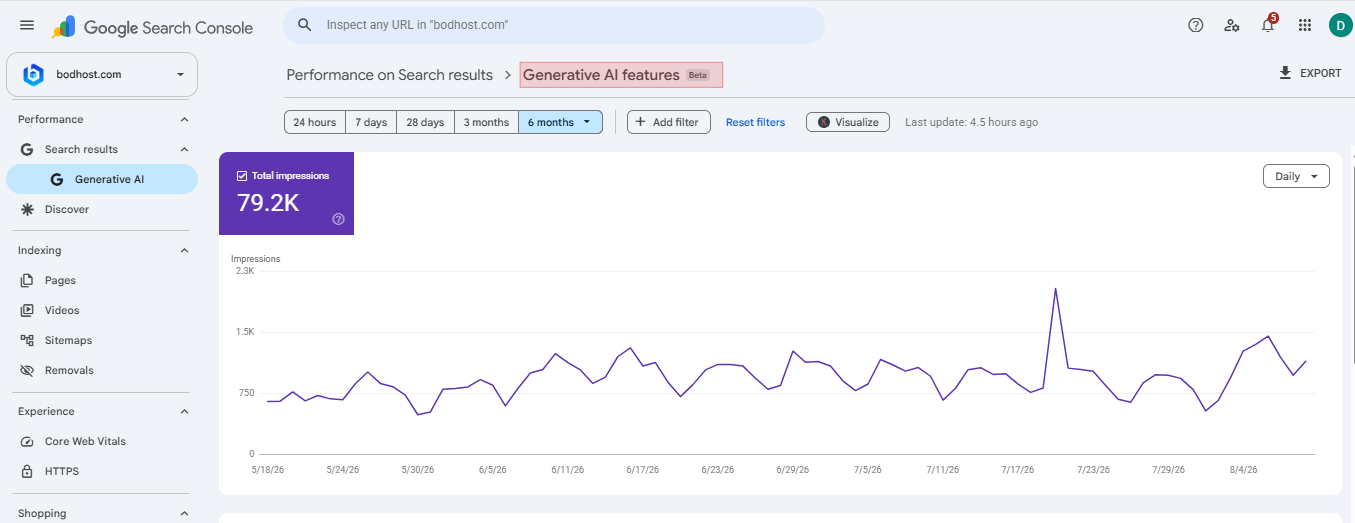
Google Search Console Generative AI Performance bodHOST Report showing total impressions and performance trends.
If you do not see the report in your Search Console account, it does not necessarily indicate an issue with your website. The rollout is ongoing, and Google may also require sufficient impressions from eligible AI features before meaningful data is available. As the feature becomes more widely available, more website owners should be able to use it to monitor their presence in AI-powered Search.
Google has also introduced controls that allow website owners to manage whether their content can appear in supported generative AI features. If a website is excluded from these experiences, its pages will not be eligible to receive impressions through those generative AI features. However, this exclusion does not automatically remove the website from traditional Google Search results.
This distinction is important. Blocking AI visibility and blocking traditional Search visibility are separate considerations. Before choosing to restrict AI visibility, businesses should consider how much value they receive from organic discovery and brand exposure. For some websites, appearing within an AI-generated answer may provide useful visibility even when that exposure does not immediately result in a click.
The decision should therefore be based on the website’s overall content and search strategy rather than AI impressions alone.
The introduction of this report is significant because the way people interact with search is changing. Traditional Search results remain important, but AI-powered experiences are becoming another way for users to discover information. Until now, SEO teams had limited first-party data for understanding visibility within these experiences. The new report provides a clearer view of how often website content appears in supported generative AI features.
For content teams, it can help identify pages receiving AI visibility. SEO professionals can compare this information with traditional Search performance, while businesses can use it as an additional signal when evaluating their online presence. However, the report should not replace traditional SEO measurement. Clicks, organic traffic, conversions, rankings, engagement, and revenue remain important when determining whether search visibility is delivering business results.
The report becomes more useful when its data is compared with other SEO and website performance information.
The report is a useful starting point, but it does not provide everything SEO professionals may want to know. The most noticeable gaps are clicks, CTR, and search queries. Without query-level information, marketers cannot determine exactly which searches or conversational prompts resulted in an AI appearance.
Similarly, without click data, it is difficult to determine how much AI visibility is translating into website traffic. Google may expand the report as its generative AI search experiences develop and as it receives feedback from website owners. For now, AI impressions should be treated primarily as a visibility indicator rather than a complete performance measurement.
Another limitation is availability. Since the report is being rolled out gradually, some Search Console properties may not have access yet.
The Search Generative AI Performance Report gives website owners and SEO professionals a new way to understand how their content appears in Google’s AI-powered search experiences. While the current report is limited to impressions and selected dimensions, it provides useful visibility that was previously difficult to measure directly.
For now, the best approach is to use this data alongside traditional Search Console metrics, website analytics, and conversion information. As Google’s generative AI experiences continue to evolve, monitoring these reports can help SEO teams better understand changing search behavior and adapt their content strategies accordingly.
Learn more in our detailed article: Google Search Console Adds Annotation Feature for SEO Reports

Explore more hosting insights, tips and industry updates.
Today, the need for a website for all companies can not be stressed enough. It…
If you want to update your kernel with rpm then you have to follow the…
Vmware Hardware virtualization technique initially utilized different segments to deliver isolation between guest OS and…