How to switch between LiteSpeed and Apache in WHM
In this tutorial, we’ll explain how to switch between Lite Speed and Apache in WHM.…

In this article, we’ll review How to Disable ModSecurity in cPanel. ModSecurity, often known as Modsec, is a free web application firewall. It is an Apache HTTP Server software solution that defends your site from brute-force attacks. By default, it is set to execute on all new accounts automatically.
However, there are situations when you’ll need to disable ModSecurity to remedy a problem temporarily.
How to Turn Off ModSecurity in cPanel
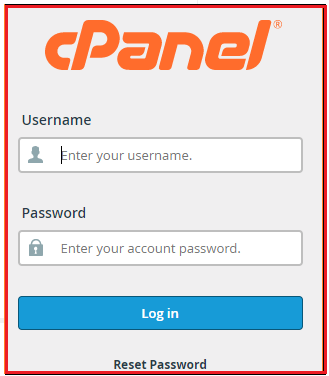
1. Go to your “cPanel account and log in”
2. Click the “ModSecurity” option in the “Security section“

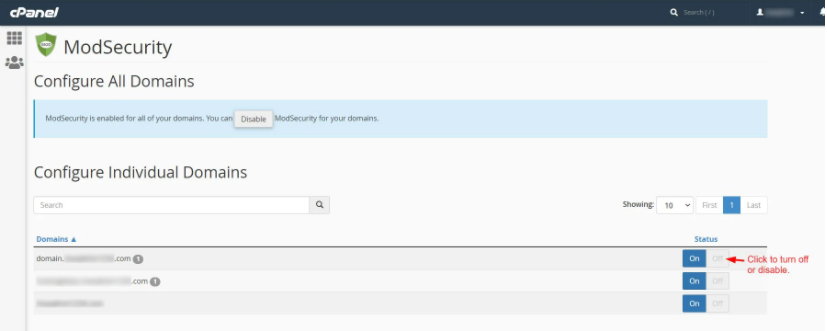
Under your cPanel account, you may view a list of domains.
3. Click the Off switch beneath a domain’s Status to enable/disable ModSecurity. Sort out the problem you’re having and remedy it.
4. Sort out and fix the issue you have
5. Finally, turn on ModSecurity for the domain by pressing the On button.

Warning: After troubleshooting the issue, turn on the domain’s ModSecurity immediately. If you don’t, it could jeopardize your security. Never leave ModSecurity disabled for an extended period of time.
We sincerely hope you have a clear idea regarding How to Disable ModSecurity in cPanel. However, if you are still facing any difficulty in the procedure mentioned above, feel free to reach out to the bodHOST Team for proactive support 24×7

Explore more hosting insights, tips and industry updates.
In this tutorial, we’ll explain how to switch between Lite Speed and Apache in WHM.…
This article provides systematic instructions on how to install Frog CMS on your bodhost hosting…
To manage disk space in Plesk is simple and ensures that resources are allocated efficiently.…