How Does R1Soft Backup Work?
The Internet is the Internet and many things can happen so it’s good to have…

In this tutorial, we’ll show you how to set a PHP upload size restriction. Introduction:-The maximum file upload size in cPanel is set to 2MB by default. To increase the upload limit, follow this procedure.
To proceed, follow the Procedure:
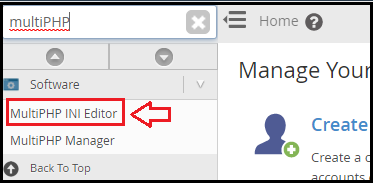
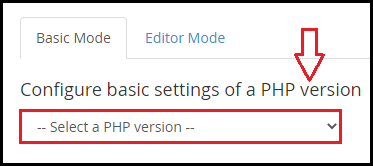

post_max_size (This should be at least as big as upload max file size.)
memory_limit (This should be at least as big as post max size.)
max_execution_time (Optional, but it can help prevent timeout issues while working with huge files.)
Repeat for all PHP versions that demand larger file upload sizes.
Note: Please keep in mind that these variables have a maximum capacity of 2GB.
Conclusion
We sincerely hope that you must now have got a clear idea regarding how can you increase the maximum file upload size limit in PHP. If you continue to have problems with the procedure outlined above, please contact the bodHOST Team for proactive help 24×7.

Explore more hosting insights, tips and industry updates.
The Internet is the Internet and many things can happen so it’s good to have…
The ‘du’ command in Linux is a standard Unix/Linux command to check the capacity of…
When exploring VPS hosting or server setups, you’ll often come across two terms: Physical RAM…