Microsoft eCommerce Dedicated Servers
Applications installed on a Windows dedicated Server also include Commerce Server. It is basically a…

 Paul Lopez
Users can use cPanel’s User Manager tool to create new user accounts related to Email, FTP, or Web Disk Services. In this post, we are going to give you a detailed step-wise procedure on how to create a new user account in cPanel. set up their passwords, and allot certain services that are made available to the new user.
Accessing the User Manager


You also have the choice to either ask the user to create his password or provide him with one.
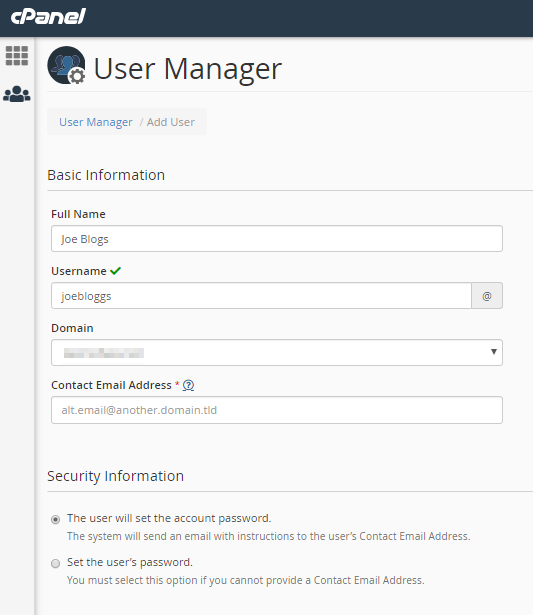
If you allow the user to set his password. An email sent to him with instructions on how to do it. If you set the password, a dialog box opens where you can generate a random password or fetch one you created.
You can enable or disable the user services by clicking on the slider placed next to each of the service boxes present at the bottom of the form.
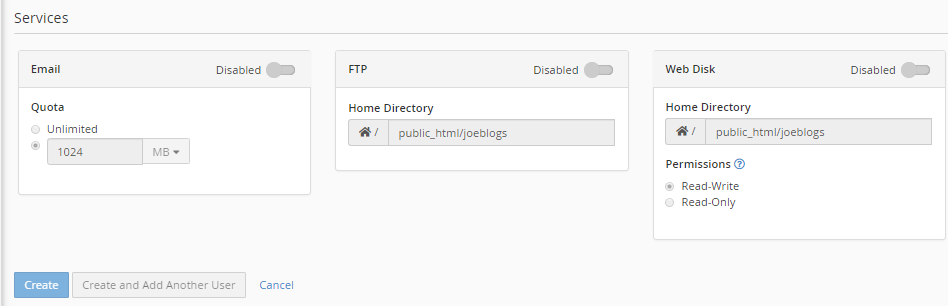
When you enable any service, you can set the following options-
Once all the user details entered and granted the required access and permissions. Click on the Create button present at the end of the page.
Hence, the new user created on cPanel.
We sincerely hope that you must now have got a clear idea regarding how you can add a new user in cPanel. However, if you are still facing any difficulty in the procedure mentioned above. Feel free to reach out to the bodHOST Team for proactive support 24×7.

Explore more hosting insights, tips and industry updates.
Applications installed on a Windows dedicated Server also include Commerce Server. It is basically a…
In this article, we will explain how to use the DNS zone editor in cPanel.…
Presentation: You might have noticed that bodHOST offers two special servers based on these two…