How to Deactivate ModSecurity in cPanel
This post will show you how to deactivate ModSecurity in cPanel. Let us follow these…

 admin
admin

In this tutorial, we will see how to create multiple instances on a dedicated server with OpenVPN!
Now we will see the configuration part:
The only prerequisite is that this configuration uses a different DHCP range and a different port. It is necessary to change the following lines:
– port 443
– Server 10.9.0.0 255.255.255.0
Left a configuration file for port 443 and right for port 80:
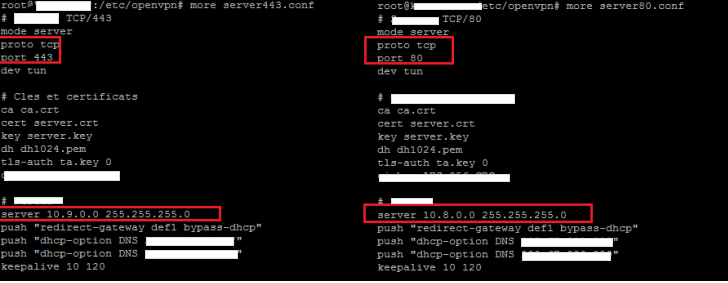
So there would be no conflict between the two configuration files. Thereafter it will add new iptables to allow the new VPN NAT:
iptables -t nat -A POSTROUTING -s 10.9.0.0/24 -o eth0 -j MASQUERAD
Thereafter we can ensure that both configurations are functional:

With this configuration management, the management of your VPN will be more flexible!

Explore more hosting insights, tips and industry updates.
This post will show you how to deactivate ModSecurity in cPanel. Let us follow these…
Today’s internet is mostly dependent on search engines. However, it all started with a much…
This article provides systematic instructions on how to install Frog CMS on your bodhost hosting…