How to Delete All WordPress Comments in One Go
Comments often serve as a communication platform for all your website visitors. However, due to…

 admin
admin
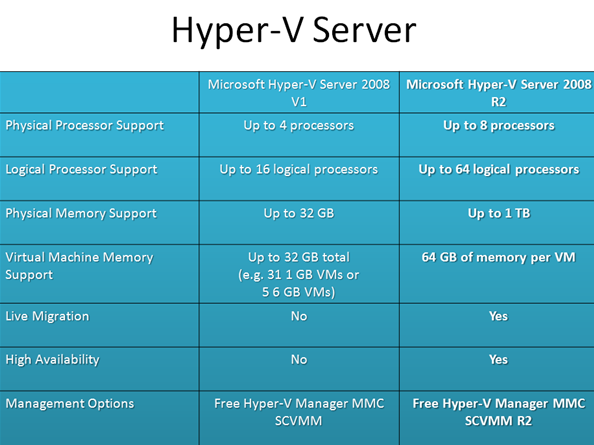
The new stand-alone hypervisor from Microsoft designed to further the efficiency of the virtualization technology. Today organizations require increasingly adaptive applications and technologies to streamline their IT operations and reduce costs.
The new Hyper V Server 2008 R2 has added features like live migration, an expanded processor and memory support for host systems.
There are several features of Microsoft Hyper-v 2008 R2 designed to improve its performance:
The new hypervisor has made it possible for IT admins to enhance their existing virtualized environment. It has tools for patching, provisioning, management, and support services. The learning curve is not very steep for those familiar with the previous versions of the hypervisor. Overall, this is the next-generation hypervisor designed for better performance and output for your virtualized environment.

Explore more hosting insights, tips and industry updates.
Comments often serve as a communication platform for all your website visitors. However, due to…
In the strong public feeling of economic pressure, large organizations and even small companies are…
Introduction to .htaccess .htaccess is a small text file that controls the configuration aspects of…