How to Fix Memory Limit Issues in WordPress & PHP
In this guide, you will explore how to resolve memory limit issues in WordPress and…

 Paul Lopez
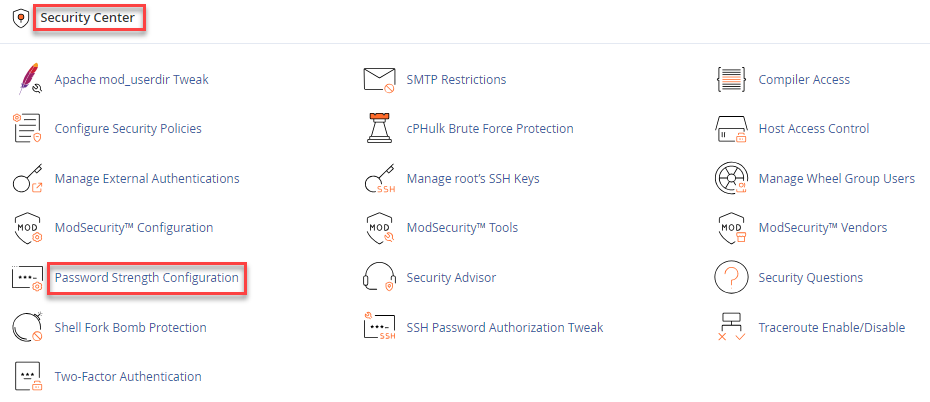
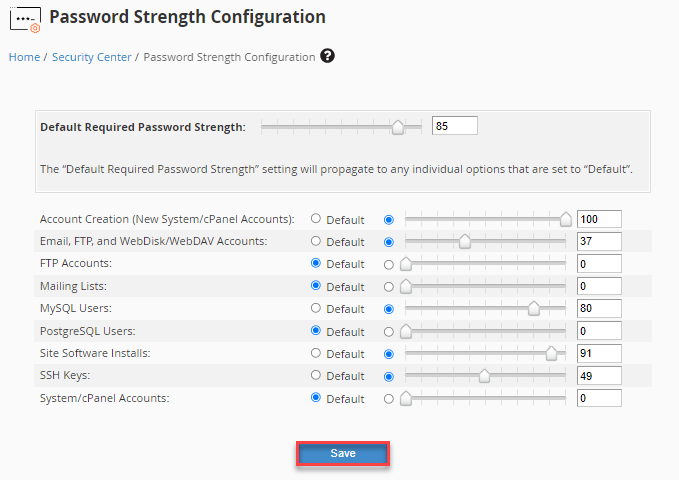
This guide will help you understand how to configure password strength for users in WHM. For any hosting user who logs in with a password, server security is very important. Stronger password requirements help protect accounts from unauthorized access. WHM allows server administrators to set the minimum password strength for cPanel users and other services on the server.
Follow the steps below to configure password strength in WHM:
We hope this guide helps you understand how to configure password strength for users in WHM. For related information, you can also read: How to Reset Your cPanel Account Password in WHM.

Explore more hosting insights, tips and industry updates.
In this guide, you will explore how to resolve memory limit issues in WordPress and…
If you check the properties of a Site in IIS, you can find that the…
This guide explains how to install Fail2ban on Ubuntu 22.04. A strong intrusion prevention software…