
How to Save a MySQL Database Quickly with MySQLDump in Linux?
Summary: In a previous tutorial, we have seen how to save a MySQL Database with…

This article explains how to manually update a WordPress site.
Manually updating WordPress
A WordPress installation should be updated on a regular basis to guarantee that it is running the most recent version. This is due to a number of factors:
Security: WordPress updates include security fixes that address security flaws. Applying updates on a regular basis is one of the most critical things you can do to keep your WordPress site safer.
Stability: WordPress updates include bug fixes and other improvements. When you apply the most recent updates, your site becomes more stable.
New features: WordPress is always evolving, and using the most recent version gives you access to the most up-to-date features and capabilities.
Follow these steps to upgrade WordPress:
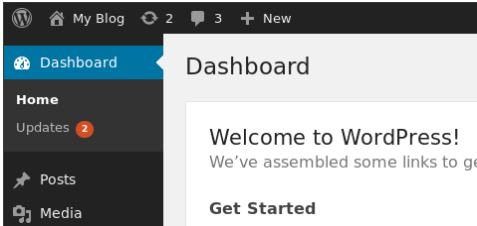
To update plugins, click Update Plugins after selecting the plugin or plugins you want to update.
To update themes, click Update Themes after selecting the theme or themes you want to update.
Conclusion
We hope that you now have a good understanding of How To Manually Update WordPress. If you continue to have problems with the protocol outlined above, please contact the bodHOST Team for constructive assistance 24/7. If you are looking for the perfect managed WordPress hosting for your business blog, then choose bodHOST.
Discover How To Add WordPress Categories. Dive deeper into optimizing your site’s navigation and enhancing user experience with categorized posts through our detailed tutorial.

Explore more hosting insights, tips and industry updates.
Summary: In a previous tutorial, we have seen how to save a MySQL Database with…
To activate the FTP mode in ensim control panel to ACTIVE mode the following has…
Learn how to make files download directly when you click their links, rather than opening…