
eNlight Cloud Computing vs RackSpace vs Amazon vs Gogrid
Today we are going to compare eNlight cloud configuration tool with the other leading cloud…

ImageMagick is a free, open-source plugin that allows you to edit and convert photos in thousands of various file formats. Since PHP script may use its image editing features via an extension, it is quite popular in the Linux community.
System administrators are frequently asked to install ImageMagick since it is used by so many websites. It’s strange, though, that WHM’s creators didn’t add a simple mechanism to configure it from the GUI.
However, as this short article shows, installing ImageMagick and its PHP via WHM.
Follow the following steps to install ImageMagick Extension For PHP Version:-

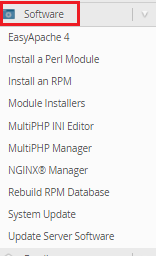

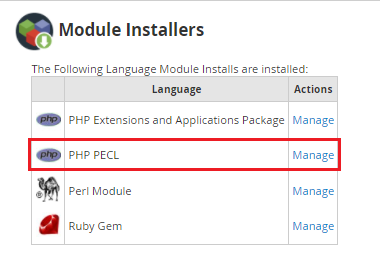
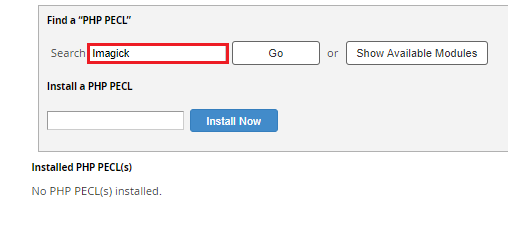
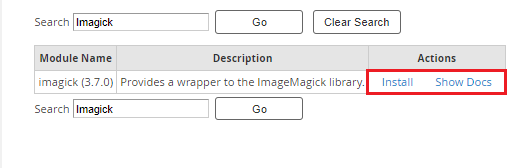

We hope that you now have a good understanding of How To Install ImageMagick Extension For A PHP Version Via WHM. If you continue to have problems with the protocol outlined above, please contact the bodHOST Team for constructive assistance 24×7.

Explore more hosting insights, tips and industry updates.
Today we are going to compare eNlight cloud configuration tool with the other leading cloud…
A business disaster occurs when the essential elements of a business are unable to function…
If you are unaware of this term, then it belongs to – the domain pointing…