bodHOST
  • Web Hosting

    Web Hosting

    cPanel Web Hosting

    Linux Shared Hosting

    Affordable hosting solution that offers features such as cPanel, multiple PHP versions.

    Windows Hosting

    Windows Shared Hosting

    Reliable hosting that offers Plesk control panel, multiple ASP.NET & PHP versions.

    WordPress Hosting

    WordPress Hosting

    Designed to cater specifically to the needs of WordPress websites with automatic updates, & backup options.

    Linux Reseller Hosting

    Linux Reseller Hosting

    Lets you sell hosting services to clients using a Linux server with advanced features and 24/7 support.

    Windows Reseller Hosting

    Windows Reseller Hosting

    Lets you sell hosting services to clients using a Windows-based server.

  • Web Servers

    Web Servers

    VPS Hosting

    Self-managed VPS Hosting

    Offers VPS servers with full root access, choice of OS & customizable configurations

    Linux VPS Hosting

    Linux VPS Hosting

    Provides VPS servers with SSD storage, free backups and 24/7 support.

    Windows VPS Hosting

    Windows VPS Hosting

    Delivers VPS servers with Windows OS, choice of configurations and 24/7 support.

    Cloud Servers

    Cloud Hosting

    Offers scalable hosting with multiple data centers, load balancing and automatic failover.

    Dedicated Servers

    Dedicated Servers

    Offers secure hosting with a choice of OS, DDoS protection, and 24/7 technical support.

  • Domains

    Domains

    Register a Domain

    Domain Name Search

    Find the perfect domain name for your website, Enjoy cheap pricing & wide range of TLDs.

    Register a Domain

    Domain Transfer

    Start by selecting a distinctive domain name & building the perfect website identity.

    Domain ID Protect

    Domain ID Protect

    Ensures the confidentiality of personal information in the WHOIS database.

  • Security

    Security Tools

    SSL Certificates

    SSL Certificate

    Offers encryption & data integrity,enabling secure online transactions.

    Remote Backups

    Remote Backups

    Data backup solution with offsite backups, encryption and 24/7 monitoring.

    SpamExperts Spam Filter

    Spam Filters

    Tools that detects & block spam, phishing, and malware emails, ensuring a safe email communication environment.

    Email Signing Certificates

    Email Signing Certificate

    Digital certificate that adds a layer of security to email communication.

    Email Signing Certificates

    Imunify 360

    Provides advanced protection against various types of malware, viruses, and other threats.

  • Contact us
  • Client Login

How To Add An FTP Account In cPanel

March 30, 2022 / cPanel

We’ll go over what FTP is and how to set up an FTP account in cPanel in this tutorial. Using FTP, each user can use the same cPanel (Control Panel) with username and password, but you can create additional FTP Accounts at any time from your cPanel.

What is FTP?

FTP (File Transfer Protocol) is a network for transmitting data or files from one computer to another across a TCP/IP network, such as the Internet. It also enables individuals and groups to share and exchange data both within and outside of businesses, workplaces, and at home. FTP was one of the first solutions to address this problem, and it is still the second most widely used protocol today.

Follow the following steps below to Create an FTP account in cPanel.
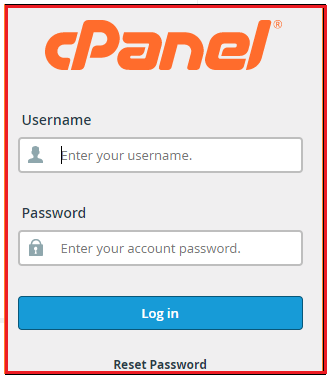
  1. You need to login into your “cPanel account”
  2. Search for the Files option and click on the “FTP Accounts”
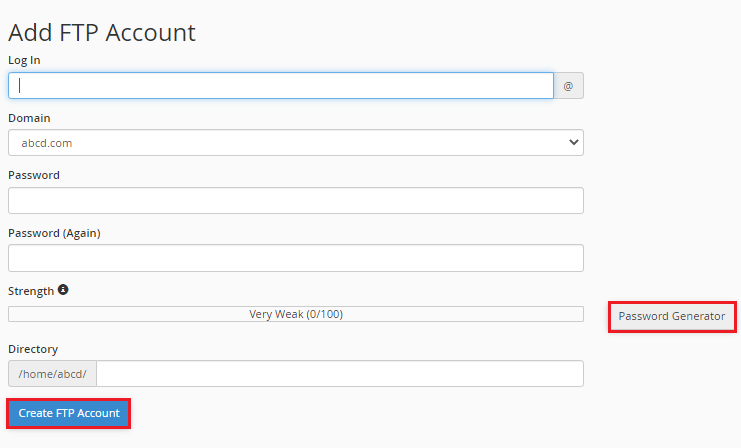
  3. Fill up the all details to create your account.

    Note – Type a strong password in this field. Do you require assistance with creating a secure password? To build a strong password, use the Password Generator button or read our entire Password Strength and Security advice.
  4. Once you’ve done filling out your information, click the Create FTP account option. As you can see, there will be an “Account Created” indication on the screen.
    In this way, your cPanel FTP account has been created.

Conclusion

Was this information helpful to you? Then you’ll be grateful for our support. With the Hosting difference, you may get a pre-secured, pre-optimized website right now. If you require any additional assistance, please submit a request to our bodHOST support team. We’d be happy to take a look.

Posted in: cPanel Tagged with: cPanel, FTP Account

Categories

Recent Posts

  • How to Manage Nginx with Start, Stop, and Restart
  • What Are CPU Cores vs Threads?
  • Determining MySQL Database Storage Size and Table Size
  • How Can I Find the Private Key for SSL Certificate?
  • Top 5 Linux Distros for Web Hosting

Web Hosting

  • - Linux Shared Hosting
  • - Windows Shared Hosting
  • - WordPress Hosting
  • - Linux Reseller Hosting
  • - Windows Reseller Hosting

Web Servers

  • - Self-Managed VPS Hosting
  • - Linux VPS Hosting
  • - Windows VPS Hosting
  • - Dedicated Servers
  • - Cloud Hosting
  • - Servers Sale

Domains

  • - Domain Name Search
  • - Domain Transfer
  • - Domain ID Protect

Security Tools

  • - SSL Certificate
  • - Remote Backups
  • - Spam Filters
  • - Email Signing Certificate
  • - Imunify 360

Community

  • - Blog
  • - Knowledgebase

Resources

  • - Client Login
  • - Request Quote
  • - Partner Program
  • - Sitemap

About bodHOST

  • - Why Choose bodHOST
  • - Customer Testimonials
  • - Our Datacenters
  • - Uptime Commitment
  • - Contact Us

Legal

  • - Terms & Conditions
  • - Service Level Agreement
  • - Privacy Policy
  • - Billing Policies

bodhost

Digital guardian of your online presence, armed with robust web hosting solutions that stand the test of time...

Subscribe to Newsletter!

Stay in the loop with our latest news, offers, and updates by subscribing to our newsletter.

Find us on

  • Paypal
  • Mastercard
  • Visa

Copyright 2026 © bodHOST.

All Rights Reserved.