Introduction to the Eleven Key Components of OpenStack – Part 1
What is this OpenStack? Does that mean opening the stack of applications? No no that’s…


 Serena
The only option for manually restarting any service is to use a dedicated server with root access granted to the user. The Apache service can be restarted in the following ways:

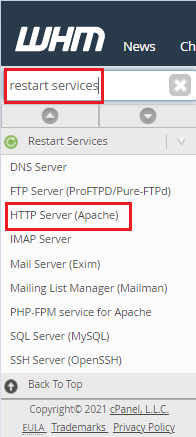
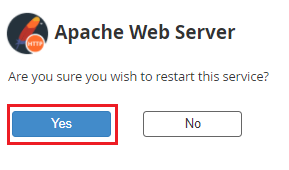
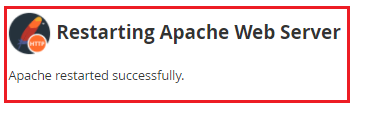
Command-line –
After logging in to the server through SSH, you must run the following command to restart Apache from the terminal:
1 /etc/init.d/httpd restart
Conclusion
We hope you now understand how to Restart Apache on Dedicated Server. If you continue to have issues with the above-mentioned protocol, please contact the bodHOST Team for constructive assistance. 7 days a week, 24 hours a day.

Explore more hosting insights, tips and industry updates.
What is this OpenStack? Does that mean opening the stack of applications? No no that’s…
Summary Since the availability of Windows Server 2012, several new features of storage have made…
Q: What will happen if the allocated bandwidth to my account exceeded? A: Once your…