
Inter-Procedure Call Socket
An Inter-Procedure Call (IPC) Socket, also known as a UNIX Domain Socket, is a special…

 Paul Lopez
In this article, you will learn how to check the size of MySQL databases and tables with phpMyAdmin or the MySQL command-line tool, for better monitoring of your databases, managing your storage, and optimising performance.
You can easily check MySQL database and table sizes through the phpMyAdmin interface. Use the steps below to see detailed database storage information.
1. Log in to your cPanel account.
Simple to access and manage your website databases and hosting settings by logging into your cPanel account.
2. To access and administer your MySQL databases, click phpMyAdmin under the DATABASES section in cPanel.

The phpMyAdmin dashboard opens in a new window, where you can manage and view your databases with ease.
3. Select the name of the database you want to work on in the left panel and check in phpMyAdmin.
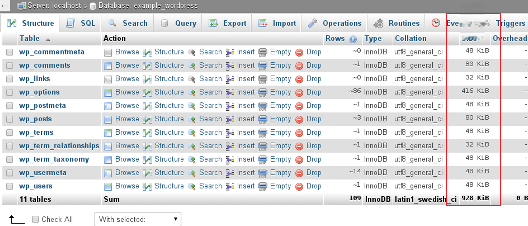
4. In the right panel, look at the Size column to see how much space each table takes up in the database.
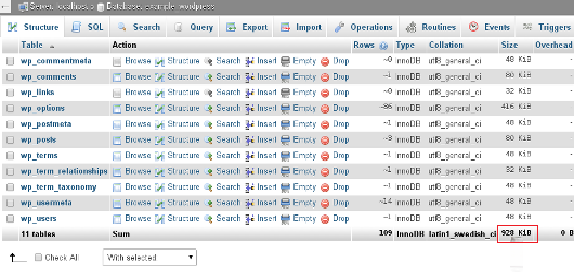
 5. Scroll to the bottom of the Size column in phpMyAdmin to get the total database size.
If you want to see database and table sizes, here are some steps to do this using the MySQL command-line tool.
1. Log in securely to your server account using SSH to access the command-line interface for database management.
2. Open a terminal and type the following, replacing “username” with your actual account username.
mysql -u username -p
3. When asked, type in your password. After you log in successfully, the mysql> command prompt will show up for the next steps.
4. At the mysql> prompt, run the command below to view the size of all your databases.
Bash
SELECT table_schema AS "Database",
ROUND(SUM(data_length + index_length) / 1024 / 1024, 2) AS "Size (MB)"
FROM information_schema.TABLES
GROUP BY table_schema;
Note: Depending on the number and size of your databases, this command may take a few minutes to finish. Once completed, it displays all databases along with their sizes in megabytes.
5. At the mysql> prompt, run the command below to view the size of all tables in a specific database. Replace “database_name” with your target database name.
Bash
SELECT table_name AS "Table",
ROUND(((data_length + index_length) / 1024 / 1024), 2) AS "Size (MB)"
FROM information_schema.TABLES
WHERE table_schema = "database_name"
ORDER BY (data_length + index_length) DESC;
Note: Once the command completes, it shows all tables with their sizes in megabytes, sorted from largest to smallest.
How can you map MySQL databases and users to cPanel users? Learn an easy, step-by-step method for organizing and managing access.

Explore more hosting insights, tips and industry updates.
An Inter-Procedure Call (IPC) Socket, also known as a UNIX Domain Socket, is a special…
First of all, we will see what LBSA is: The security of Linux systems often…
We will go over how to enable PHP-FPM exec() in this post. Sometimes after enabling…