How To Deal With The Error – ‘412 Precondition Failed’?
The ‘412 Precondition Failed’ error message is displayed on any of the web pages of…

 Vincer
Keeping your Windows operating system up to date is one of the simplest and most important ways to protect your computer. Updates bring security patches, bug fixes, and performance improvements that help your PC or laptop run smoothly and stay safe from threats. In this article, we will show you how to check for and install Windows updates using the built-in Windows Update tool.
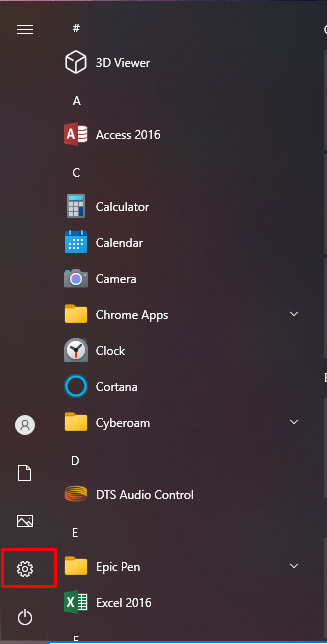
1. First, click on the Start button (the Windows logo) located at the bottom-left corner of your screen. From the Start menu, click on Settings (it looks like a gear icon).

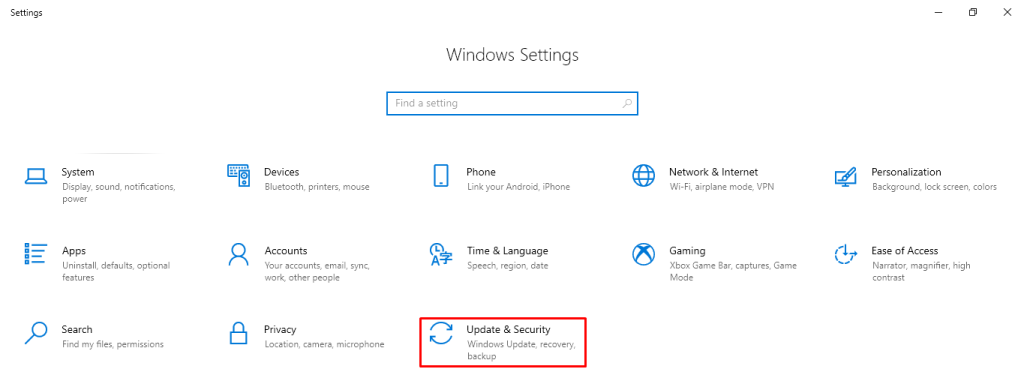
2. In the Settings window, click on Update & Security. This section is where Windows manages all system updates, recovery options, and security features.
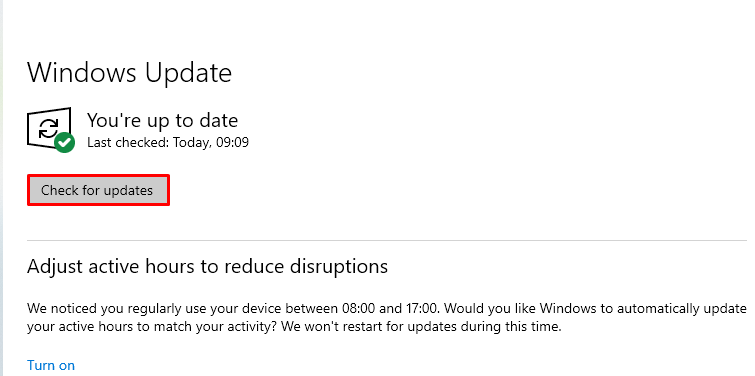
3. On the Windows Update page, click the Check for updates button. Windows will now connect to Microsoft’s servers and look for any available updates for your system.
4. If updates are available, Windows will show a list of them. Click on Download and install. The system will start downloading the required files. Depending on the size of the updates and your internet speed, this process may take a few minutes.
5. Once the download is complete, you will usually see a message that says Restart required.

6. Click on Restart now to finish installing the updates. Your computer will restart, and Windows will complete the installation process during the reboot. After the restart, your system will be running the latest version of Windows with all the new security and performance improvements applied.
This way, you can install the Windows update on your PC or Laptop.
Find more knowledge base about How to locate and edit your hosts file in Windows 10

Explore more hosting insights, tips and industry updates.
The ‘412 Precondition Failed’ error message is displayed on any of the web pages of…
When your visitors are submitting personal and sensitive information on your website. It is necessary…
The size of SQL Server Database can be reduced/shrunk using any of the following two…