Shoutcast Installation On VPS Server
You can install with the following on your VPS server: Refer www.shoutcast.com/download tar -zxvf shoutcast-1-9-5-linux-glibc6.tar.gz…

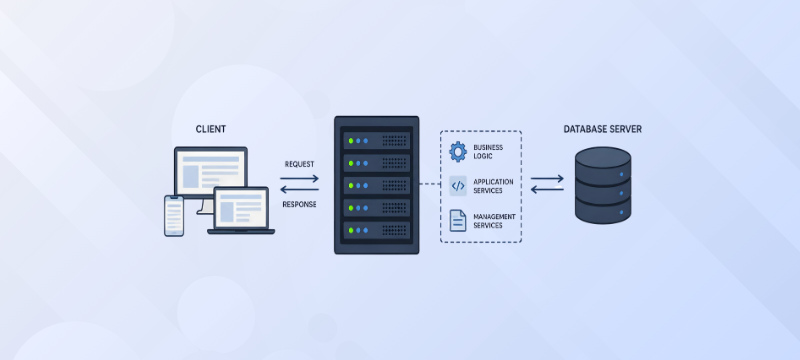
 Paul Lopez
When you visit an online store, log in to a business portal, check your bank account, or use a SaaS application, the information displayed on your screen is usually the result of several processes happening behind the scenes. For example, when you log in to an e-commerce website, the system has to verify your credentials, identify your account, retrieve the relevant information, maintain your session, and display your account details. If you place an order, it may also need to check inventory, calculate the order amount, communicate with a payment service, and update the database.
An application server helps handle this type of application processing. It provides an environment where application code can run and communicate with databases, APIs, services, and other resources. In a typical web application architecture, an application server sits between the web or presentation layer and backend systems. It processes application requests, applies business rules, and generates the response required by the user.
In this article, we will explain what an application server is, how it works, its key components, different types, benefits, real-world use cases, challenges, and the difference between an application server and a web server.
An application server is a software platform that provides an environment for running application logic and managing communication between different parts of an application. For example, when you place an order on an e-commerce website, the application needs to do more than display a product page. It may need to check product availability, calculate the total price, process customer information, communicate with a payment service, update the database, and generate an order confirmation.
The application server helps handle this type of processing. It provides services and resources that allow applications to perform these tasks in a controlled and organized environment. Unlike a basic web server, which mainly handles web requests and delivers static or dynamic web content, an application server is designed to handle more complex application operations.
An application server usually works as part of a larger application architecture. A common setup includes a client or browser, a web server or reverse proxy, an application server, and a database or other backend services.
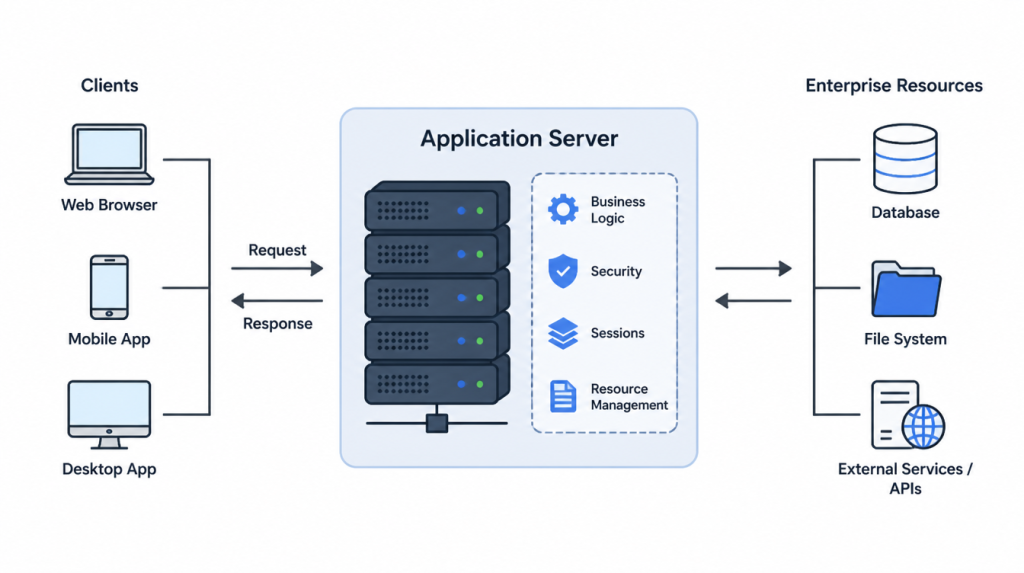
The exact architecture can vary, but the request generally follows these steps:
The process begins when a user acts. This could be opening a page, logging into an account, searching for a product, submitting a form, or placing an order. The user’s browser or application sends a request to the server.
In many web applications, the initial request reaches a web server or reverse proxy. The web server can handle requests for static resources such as HTML, CSS, JavaScript files, images, and other content. If the request requires application processing, it can forward the request to the application server.
The application server receives the request and determines what the application needs to do. It may validate the user’s session, check permissions, execute application logic, process input, or determine which backend resources need to be accessed.
For example, if a customer searches for a product, the application server can process the search request and communicate with the database to retrieve matching products.
The application may need information from a database or another service. The application server can communicate with these resources, retrieve or update information, and process the results according to the application’s rules.
For an e-commerce order, this could involve checking inventory, calculating the total amount, communicating with a payment service, and updating order information.
After the required processing is completed, the application server generates the appropriate response. Depending on the application, this response could contain an HTML page, JSON data for an API, account information, search results, or another type of application output.
The response is sent back through the web server or directly to the client, depending on the application architecture. The browser or application then displays the result to the user. This process usually happens very quickly. The user may only see a page loading on the screen, while several backend operations are being completed at the same time.
An application server consists of several components that work together to run applications and manage requests.
Application servers can differ based on the programming language, application framework, and environment they support. Some commonly used types include:
Java application servers are designed to run enterprise applications built using Java technologies. Examples include Apache Tomcat, WildFly, and Payara. They are commonly used for enterprise applications and systems that require structured application management.
Applications built using Microsoft’s .NET technologies can run in environments based on Windows or cross-platform .NET infrastructure. These environments are commonly used for business applications, APIs, and enterprise software.
Node.js is widely used for applications that require efficient handling of many simultaneous connections. It is commonly used for APIs, real-time applications, web applications, and backend services.
PHP applications can run using web server and application runtime configurations that support PHP processing. These environments are commonly used for websites, content management systems, and web applications.
The right application server or runtime environment depends on the application’s programming language, architecture, workload, and deployment requirements.
Application servers provide several benefits, particularly for applications that require more processing than a basic website.
Application servers provide a structured environment for running application components. This can make it easier for development and infrastructure teams to manage applications.
As application traffic grows, organizations may need additional server resources or multiple application server instances. Application servers can support architectures where workloads are distributed across multiple servers.
Application servers can provide security features for authentication, authorization, sessions, and communication between application components.
Applications often need access to databases, files, APIs, and other services. An application server can help manage these connections and resources more efficiently.
Applications with business rules, user accounts, transactions, integrations, and database operations can benefit from an environment specifically designed for application processing.
Application server environments can support features such as load balancing, failover, monitoring, and multiple server instances, depending on the platform and architecture.
Application servers are used in many types of applications where backend processing is required.
An online store needs to process customer accounts, product information, shopping carts, orders, payments, and inventory. An application server can handle much of this backend logic.
Banking systems require secure processing for transactions, customer accounts, authentication, and financial records. Application servers can provide the environment needed to manage these operations.
SaaS platforms often serve many users at the same time. Application servers can help process user requests, manage application logic, communicate with databases, and support scalable deployments.
Organizations use application servers for internal systems such as customer management, employee portals, inventory systems, and enterprise applications.
Application servers can also be used to run APIs that allow different applications and services to communicate with each other.
Although application servers provide useful features, they also introduce some challenges.
1. Resource Requirements: Applications with high traffic or heavy processing requirements may require significant CPU, memory, storage, and network resources.
2. Configuration and Management: Application server environments can require proper configuration, updates, monitoring, and security management. Poor configuration can affect application performance or availability.
3. Security Maintenance: Application servers need to be kept updated and properly secured. Vulnerabilities in the server software or application environment can create security risks.
4. Performance Issues: Poorly optimized applications, inefficient database queries, insufficient resources, or incorrect server configurations can result in slower response times.
5. Scaling Costs: As an application grows, additional servers and infrastructure may be required. Scaling the environment can increase infrastructure and management costs. For these reasons, application server planning should consider the application’s expected traffic, resource requirements, security needs, and future growth.
A web server and an application server often work together, but they have different primary responsibilities. A web server is mainly responsible for receiving HTTP requests and delivering web content such as HTML files, images, CSS, JavaScript, and other static resources.
An application server focuses on running application logic and generating dynamic responses based on user requests, business rules, databases, and other backend services.
| Feature | Web Server | Application Server |
|---|---|---|
| Primary role | Delivers web content | Runs application logic |
| Main content | Static files and web resources | Dynamic application responses |
| Common requests | HTML, CSS, JavaScript, images, files | Login, orders, transactions, APIs, business operations |
| Database interaction | Usually indirect | Commonly interacts with databases |
| Business logic | Limited | Core responsibility |
| Session management | Limited or dependent on setup | Commonly supported |
| Transactions | Not its primary role | Often supported |
| Typical use | Websites and static content delivery | Web applications, enterprise systems, APIs, SaaS platforms |
In many environments, both servers work together. The web server can receive the user’s request and handle web traffic, while the application server processes the application logic and communicates with backend resources.
This separation can make an application easier to manage and scale.
An application server runs application logic, manages requests, and connects applications with backend resources such as databases. It is widely used for e-commerce, SaaS, banking, and enterprise applications. Choosing the right server infrastructure, such as VPS Hosting, Dedicated Servers, or Cloud Servers, helps ensure the performance, scalability, and reliability your application needs. The right infrastructure also makes it easier to manage growing workloads and support future application requirements.
For more information, read the blog: How to Leverage Cloud Hosting for Web App Development

Explore more hosting insights, tips and industry updates.
You can install with the following on your VPS server: Refer www.shoutcast.com/download tar -zxvf shoutcast-1-9-5-linux-glibc6.tar.gz…
As we all know, Microsoft Hyper-V is a virtualization solution that is mainly considered for…
Creating an online website can sometimes feel time-consuming. This is particularly true for those seeking…