
How to Install oci8 for EA-PHP
If you are having trouble installing oci8 for EA-PHP, this Article will provide you with…

If you are using Squirrel mail and often encounter a disconnection problem with the SquirrelMail interface. Then you need to understand that the SquirrelMail session gets disconnected after a certain period. This usually happens around 10-15 minutes after logging into the interface without clicking on any buttons or not performing any actions.
For example,
You are composing a very long email or staying away from the computer for several minutes or a few hours then it attempts to log out from the mail interface.
Solution:
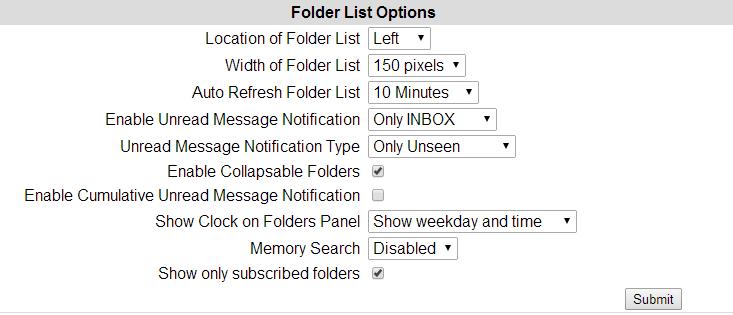
To overcome this issue you need to force Squirrel Mail to set to auto-refresh the side by X minutes. To do this you need to perform below mentioned steps:
1. Log in to the webmail http://yourdomain.com:2095
2. Click on Options
3. Click on 'Folder Preferences'. You will see an option titled 'Auto Refresh Folder List'. It is set to Never by default.
4. Change the setting to 5 minutes or 10 minutes (upon your requirement)
5. Click on the Submit.
After applying this change, you will be able to stay logged in to the main interface without session interruption. It also provides the advantage of receiving new message notifications without having to click on the check mail button.

Explore more hosting insights, tips and industry updates.
If you are having trouble installing oci8 for EA-PHP, this Article will provide you with…
An easy application, cPanel enables the monitoring of servers through a GUI interface instead of…
Are you new to Docker? Docker is an open-source, container-based software framework for creating and…