Fix rsync Failed to Connect to cPanel Error
Introduction: When updating cPanel with /scripts/updatenow, you may encounter the “rsync failed to connect to…

 admin
admin
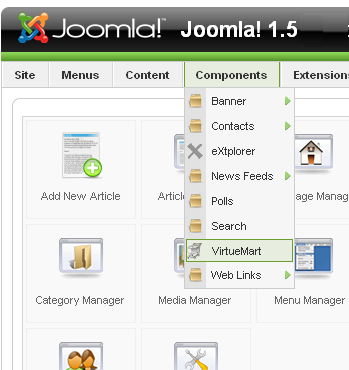
This tutorial will guide you through the process of creating a horizontal drop-down menus in your Joomla 1.5 website.
You will have to create the drop down menu through the ‘Extended Menu module’. For that you have to download and install the extension on your Joomla website. You can download this module from the websites of its creators: http://joomlacode.org/gf/project/extended_menu/frs/
Once you have downloaded and installed the module, you can start.
You can customize the appearance of your menu through the CSS. Once that is done, hover your mouse over the ‘features’ tab to display the drop down menu you created.

Explore more hosting insights, tips and industry updates.
Introduction: When updating cPanel with /scripts/updatenow, you may encounter the “rsync failed to connect to…
With the help several handy steps we can make a Zen Cart website secure. The…
Changing your Remote Desktop password is an important part of managing a Windows server securely.…