Learn more in our detailed article: How to Get Your Business Seen in Google’s New AI Mode

-
Paul Lopez
- 11 Feb, 2026
Google recently updated its documentation to clarify how Googlebot file size limits apply across different Googlebot crawlers. But how much of a webpage does Google actually process during crawling, and what happens when a page exceeds these limits? These questions are important because file size limits directly impact how content is crawled, indexed, and surfaced in search results. For modern SEO strategies, understanding these limits helps ensure that critical content remains visible, crawl-efficient, and optimised for today’s evolving search ecosystem.
Table of Contents
- What Changed in Google’s Documentation?
- Understanding Googlebot File Size Limits
- Why Googlebot File Size Limits Matter for SEO?
- Real-World Scenarios Where File Size Limits Impact Crawling
- Best Practices to Stay Within Googlebot File Size Limits
- What This Update Signals About Google’s Broader Search Strategy
- Preparing for AI Search, SGE, and Generative Engine Optimization (GEO)
- FAQs About Googlebot File Size Limits
- Conclusion
What Changed in Google’s Documentation?
Google explained that not all Googlebot crawlers are subject to the same file size limitations. According to the update, other crawlers, such as those used for photos, videos, advertisements, and discovery, may adhere to various guidelines depending on the kind and purpose of the material, even if Googlebot Search only analyzes the first 15 MB of an HTML site. This explanation clears up any misunderstandings regarding crawling behavior and gives website owners a better understanding of how different Googlebots retrieve and analyse content.
Understanding Googlebot File Size Limits
Unlimited content cannot be processed by Googlebot. As an alternative, it uses predefined limits to guarantee effective crawling and indexing of billions of pages. Publishers can better organize content to guarantee that important information is found and properly indexed by being aware of these boundaries.
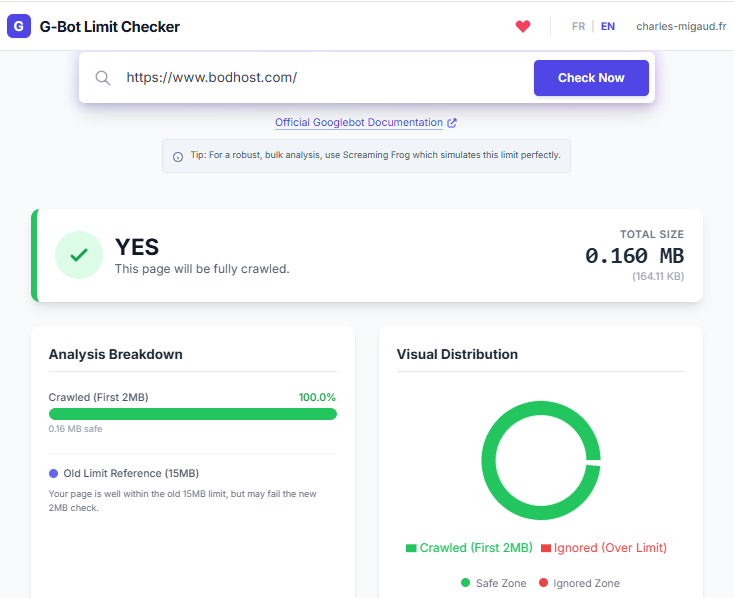
- Default Crawl Limit (15 MB): After decompression, Googlebot Search only analyzes the first 15 MB of HTML material. For indexing reasons, any information that exceeds this threshold is ignored. Text, links, and structured data are all included in this. Important content might never be seen or indexed by Google if it occurs after the threshold.
- Googlebot Search vs Other Crawlers: Other crawlers deal with specific information, whereas Googlebot Search focuses on HTML content. Ad crawlers review landing sites in different ways, while Googlebot Image manages image files, and Googlebot Video concentrates on video metadata. Crawlers can handle file sizes differently, so a page that is suitable for one use case might still have issues with search indexing.
- New Googlebot File Size Limits: Earlier, Google confirmed that Googlebot Search processes up to the first 15 MB of HTML content. Recent documentation clarifies that Google can crawl up to 64 MB of PDF files, while for other supported non-HTML file types, only the first 2 MB is processed for indexing.
Why Googlebot File Size Limits Matter for SEO?
File limits on size have a direct impact on ranking efficiency, crawl budget consumption, content visibility, and indexing accuracy. Bloated HTML might harm Core Web Vitals and slow page loading, while large pages can hide important content that is beyond Googlebot’s processing capacity. Google prioritizes high-value material, crawls pages more quickly, and indexes pages with greater accuracy when they are organized well.
Real-World Scenarios Where File Size Limits Impact Crawling
Because of their structure and content, some website types are more vulnerable to having file size problems.
- Large Financial, Technical, or Research Guides: Detailed explanations, tables, and embedded features are frequently seen in long-form guides. Important portions, like FAQs or conclusions, may be too complex for Googlebot to understand when all the content is put into one HTML file, which would lower its visibility in search results.
- JavaScript-Heavy and Interactive Web Pages: Large HTML outputs are frequently produced by web pages that primarily rely on client-side viewing, frameworks, and inline JavaScript. This may cause pages to be more difficult for Googlebot to process effectively and increase the possibility of incomplete indexing by sending important text content over the crawl limit.
- Government, Legal, and Regulatory Content Pages: Long documents, disclosures, and modifications are common on government and legal pages. Essential clauses or revisions might not be properly indexed when presented as a single, large page, which would affect accessibility for people looking for certain legal or regulatory information.
Best Practices to Stay Within Googlebot File Size Limits
Your most important information will be processed and indexed by Googlebot if you improve the structure and delivery of your content.
- Optimize and Minify HTML Output: Minimize unnecessary CSS, comments, inline scripts, and markup. Keep HTML simple and light-weight so that the most important information shows up first. This guarantees that Googlebot can read internal links, headers, body text, and structured data in full while staying under the crawl limit.
- Handle PDFs and Large Documents Strategically: Provide segment-based navigation, HTML alternatives, and highlights rather than putting whole papers on one page. For better indexing and accessibility, make sure important material is available in crawlable HTML format and optimize PDFs for size and clarity.
- Monitor Crawl Behavior and Coverage: To examine crawl statistics, indexing data, and page fetch results, use Google Search Console. You can make data-driven optimizations by using these insights to find pages with crawl defects, incomplete indexing, or excessive HTML size.
- Use Sitemaps and Internal Linking Efficiently: Logical internal linking and well-structured XML sitemaps help Google in discovering and ranking key sites more quickly. This increases the overall crawl efficiency of your website and reduces the need for deep crawling of large pages.
What This Update Signals About Google’s Broader Search Strategy
Google’s explanation shows the company’s ongoing focus on resource optimization, scalability, and efficiency. Google gives priority to content that is structured, easily readable, and simple to process as the web gets bigger and more complicated. Publishers are advised to create websites that are faster, cleaner, and easier to search for by having clear boundaries.
Preparing for AI Search, SGE, and Generative Engine Optimization (GEO)
Content segmentation, modular page design, organized data, and robust server performance are all necessary for SEO that is ready for the future. Both traditional crawlers and AI-driven search algorithms may more efficiently extract and summarize information when content is divided into logical sections, schema markup is used, and quick delivery is guaranteed.
FAQs About Googlebot File Size Limits
1. What is Google’s crawl limit for HTML pages?
Googlebot Search processes up to 15 MB of HTML content after decompression.
2. Is content beyond 15 MB completely ignored?
Yes. Any content beyond the limit is not processed or indexed by Googlebot Search.
3. Do file size limits affect rankings directly?
Although not directly, large sites may reduce performance signals, and ignored content cannot rank.
4. How can I check my HTML file size and crawlability?
In Google Search Console, you can review crawl statistics, use developer tools, and check the size of the page source.
Conclusion
Google’s clarification of Googlebot file size limitations highlights how important reliable data delivery and thoughtful page design are becoming. In this way, websites hosted with a managed web hosting provider can ensure that critical content is fully indexed and visible by keeping HTML lean, structuring content logically, and closely monitoring crawl behaviour. Combined with high-performance infrastructure such as NVMe VPS Hosting, optimising within these limits not only improves current SEO performance but also keeps sites prepared for future indexing methods and AI-driven search experiences.

Popular Posts You May Read
Explore more hosting insights, tips and industry updates.
Cloud Platforms: Open Source or Proprietary – Advantages and Disadvantages
When it comes to choosing software for Personal Computer systems, we know we can easily…

When to Upgrade Your Web Hosting Services
Shared hosting over the years has emerged as the preferred web hosting solution. For many…
Internet Inequity: 19M Americans Lack High-Speed Broadband Access
The Federal Communications Commission (FCC) announced during its eighth annual broadband progress report on the…