How Windows Shared Hosting Simplifies Website Management
Managing a website does not always require advanced server administration skills. For many businesses and…

 Paul Lopez
AI applications are becoming part of everyday business operations. They power chatbots, recommendation tools, content workflows, document search, automation systems, and customer support platforms. But a reliable AI application needs more than a working model and a well-designed interface. It also needs hosting that can handle memory-intensive processes, fast data access, steady traffic, and continuous availability.
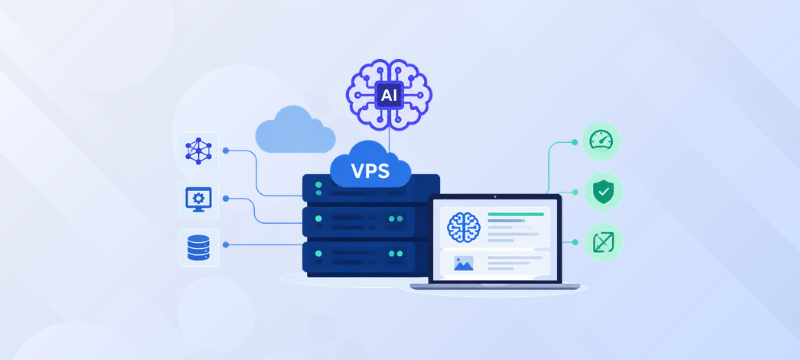
A Virtual Private Server (VPS) can be a practical middle ground for many AI projects. It offers more control and predictable resources than shared hosting without the cost and complexity of a dedicated physical server. The right plan can support AI APIs, inference services, agent workflows, vector databases, and lightweight self-hosted models.
However, not every VPS is suitable for every AI workload. The best choice depends on the type of model you are running, how many users you expect, how much data you process, and whether your application needs a GPU. This guide explains the main factors to evaluate before choosing VPS hosting for an AI application.
AI applications use resources differently from regular websites. An application that sends requests to an external AI API may need moderate capacity. A platform that loads a model directly on the VPS will require more CPU, RAM, and storage. A deployment may include an application server, inference service, database, vector database, background workers, and monitoring tools. A small project can run these on one VPS, while a larger platform may separate them across several servers.
Also distinguish between inference and model training. Inference uses an existing model to produce an answer or prediction. Many API-based tools, RAG systems, AI agents, and lightweight models can run on a strong CPU-based VPS. Training or fine-tuning large models usually requires GPUs, so confirm GPU availability for those workloads.
The CPU affects request processing, application logic, background jobs, and CPU-based inference. Both core count and consistent processing power matter. An API-driven tool may need moderate capacity because an external provider handles model processing. Self-hosted inference, document processing, embedding generation, and multiple workers need more power. Do not choose a plan based only on its vCPU count. Check whether resources are dedicated or shared and whether other users can affect performance.
Review the number of cores, processor performance, resource allocation policy, expected concurrent requests, and upgrade options. A prototype may need a balanced multi-core VPS, while heavier inference workloads need dependable capacity and room for peak usage.
RAM is critical for AI hosting. Models, databases, embeddings, operating system processes, and application services all use memory. A model may run during testing but fail when real traffic and background services are added.
As a general guide:
These ranges are not fixed requirements. Check your model’s needs and leave room for traffic spikes and updates.
AI applications regularly access model files, embeddings, datasets, documents, logs, and databases. Slow storage can increase startup times and delay data-heavy operations. NVMe storage provides faster data access than traditional SATA storage. It helps with loading model files, searching vector databases, processing documents, creating backups, and installing large frameworks. NVMe cannot replace sufficient CPU, RAM, or GPU capacity, but it can reduce storage-related delays. Check total storage as well as storage type. Models, datasets, backups, and logs can grow quickly, so set alerts before disk space becomes a problem.
An AI project may begin as an internal tool and later become a customer-facing platform. Vertical scaling means increasing the CPU, RAM, or storage of an existing VPS. It is often the simplest approach for an early-stage application. Horizontal scaling means distributing services across multiple servers. Look for flexible upgrades, additional server options, backup facilities, suitable data center locations, and support for your operating system and software stack. Monitor CPU, memory, disk space, response time, and errors so you can upgrade before performance becomes a serious problem.
AI applications may process private conversations, customer records, uploaded documents, or internal company information. Important measures include:
A VPS provides more isolation and control than shared hosting, but it does not secure an application automatically. If your team does not want to manage updates, backups, and monitoring, managed VPS hosting may be a better option.
Chatbots, automation platforms, and monitoring tools may operate around the clock. Downtime can interrupt workflows, delay responses, and reduce customer trust. Review the provider’s uptime guarantee, data center infrastructure, network reliability, backup process, and support availability. A clear service-level agreement explains how uptime is measured. Use health checks, monitor resources, and maintain a recovery plan. Business-critical applications may eventually require redundancy instead of relying on one VPS alone.
The least expensive VPS is not always the most economical choice. Insufficient RAM can cause crashes, while slow storage can increase processing time. Unused resources, however, increase monthly costs. Review peak request volume, model type, memory needs, dataset size, backup requirements, and acceptable downtime. Compare included backups, support, security features, and upgrade options, not only the monthly price. For many startups and growing businesses, a high-performance VPS provides a practical balance between control, predictable resources, and cost.
bodHOST high-performance VPS hosting provides dedicated resources, full root access, multiple Linux distributions, NVMe storage, and support for custom software configurations. These features help developers install AI frameworks, databases, workers, and monitoring tools according to their requirements.
bodHOST also offers automated backup options, enterprise-grade hardware, global data center locations, 24/7 expert support, and a stated 99.9% uptime guarantee. Flexible upgrades can help businesses increase capacity as users and workloads grow.
A bodHOST VPS may suit AI chatbots, RAG applications, AI agents, Python-based APIs, internal tools, and early-stage AI SaaS products. Teams running large models or training workloads should confirm GPU availability and supported configurations before ordering.
Choosing the best VPS hosting for an AI application starts with understanding the workload. CPU affects processing and concurrent requests, RAM determines whether models and services can run comfortably, and NVMe storage improves access to data and model files. Security, uptime, backups, support, and scalability are equally important.
For AI APIs, agents, RAG platforms, automation workflows, and smaller self-hosted models, a high-performance VPS can provide a practical balance of control, reliability, and cost. bodHOST’s dedicated resources, NVMe storage, root access, backup options, scalable plans, 24/7 support, and 99.9% uptime guarantee make it a suitable option for businesses building and growing AI applications.
For more information, read the blog: How VPS Hosting Improves Website Performance and Security

Explore more hosting insights, tips and industry updates.
Managing a website does not always require advanced server administration skills. For many businesses and…
A server is a system or software that surrounds hardware, software, or programs that are…
Well, it is a well-known fact that choosing a web hosting service provider is as…